How to Uninstall Ollama on Mac and Delete Its Models
Uninstall Ollama on Mac in five easy steps: see how big the models are, find where they live, remove them with ollama rm, trash the app and clear the leftovers.

To uninstall Ollama on a Mac, remove its models first, quit Ollama and move the app to the Trash. Then delete the hidden folder it leaves behind. If you only trash the app, the models stay, and they are the heavy part.
Ollama's logo is a llama, so think of it like this. The llama lives in a small stable. That is the app. Its hay is kept in a big barn next door. That is the models folder. If the llama moves out, the barn is still full of hay. Here are five steps to empty the barn too, with pictures from Ollama and Smart Cleaner AI.
1. See how much hay is in the barn
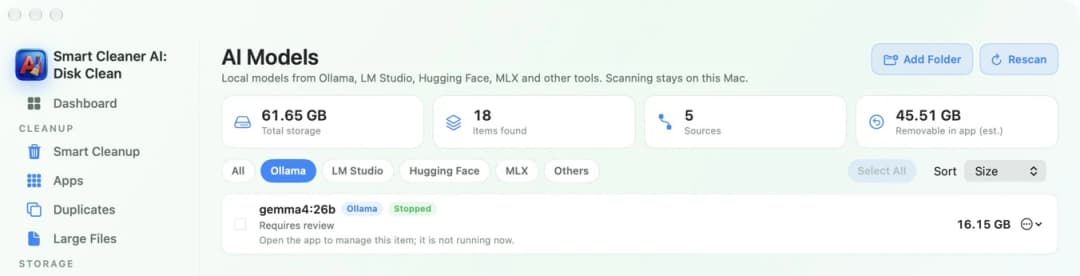
First, look at how big the pile is. A model is a very big file that lets Ollama answer you on your Mac without the internet. One model can be 5, 20 or even 40 GB. So it helps to know the size before you start.
Open AI Models in Smart Cleaner AI and click Ollama. Now you see only Ollama's models, with the size of each one. The note under a model says to open Ollama to manage it. That is right. Ollama should remove its own models. Smart Cleaner AI shows you how much there is.
2. Find where the barn is
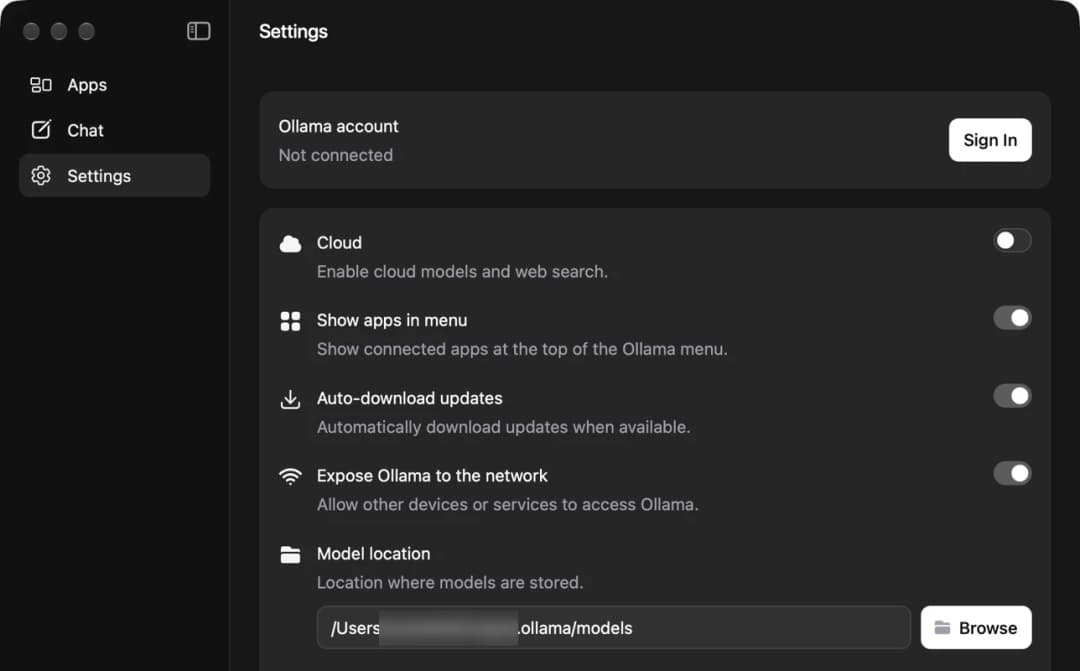
Next, find the barn. Ollama keeps its models in a hidden folder called .ollama inside your home folder. The models are in a folder named models inside it. Hidden means Finder does not show it unless you ask.
You can check the place in Ollama itself. Open Ollama, click Settings and look at Model location. If someone moved the models to another disk, this line shows the new place. Write it down. You will need it in step 5.
3. Let Ollama clear out its own hay
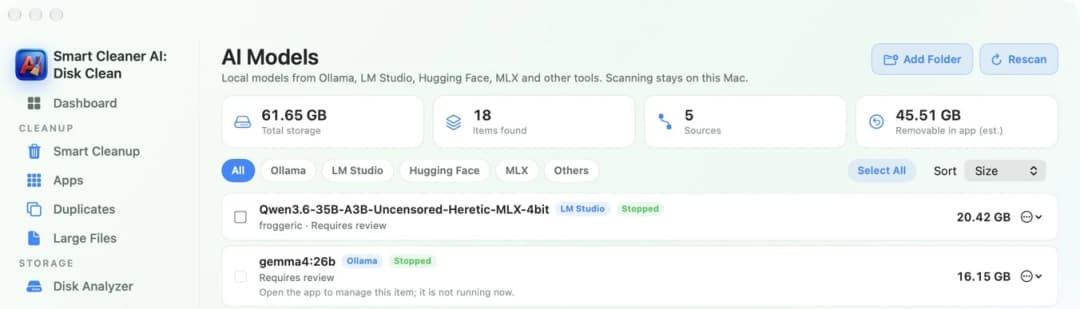
Now empty the barn while the llama is still home. Open Terminal and type ollama list. You get a list with the name and size of every model. Then type ollama rm and the name of a model, and press Return. Do this for each model you do not want.
Be careful with the name. A model removed this way does not go to the Trash. It is gone right away. When you are done, go back to AI Models in Smart Cleaner AI and press Rescan. The total at the top should be smaller now.
4. Quit Ollama and move the app to the Trash
Now the llama can move out. Ollama keeps running quietly even when its window is closed. Click the Ollama icon in the menu bar at the top of the screen and choose Quit Ollama. Close other apps that talk to Ollama too.
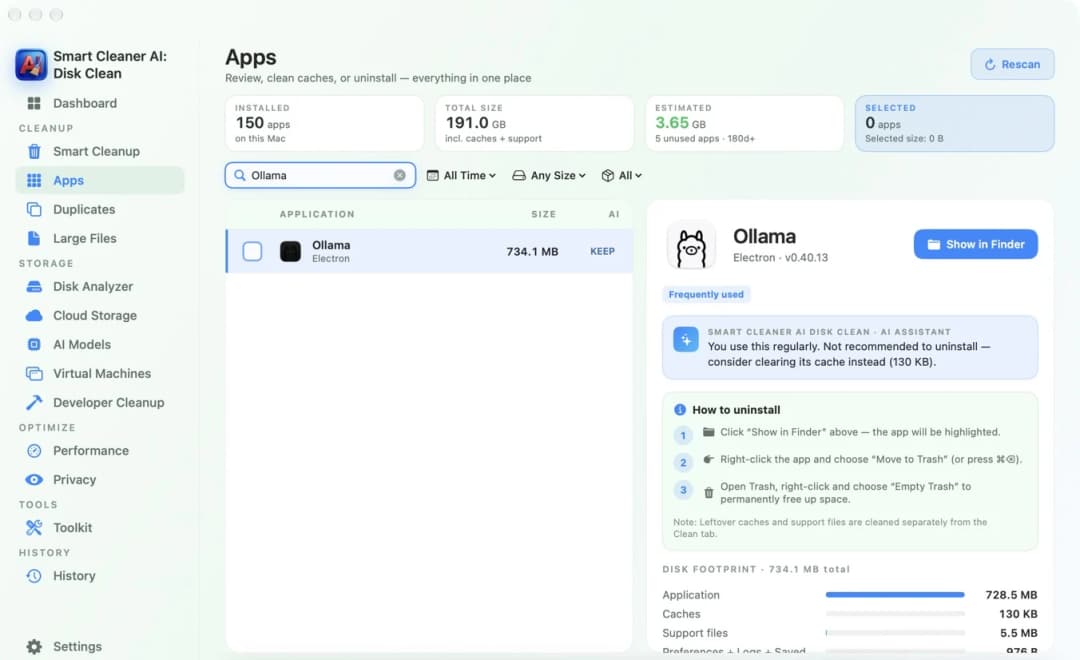
In Smart Cleaner AI, open Apps and type Ollama in the search box. Click the app. On the right you see how much space the app, its caches and its support files use. Under How to uninstall there are three short steps: show the app in Finder, move it to the Trash, then empty the Trash.
5. Sweep the barn and check your space
Last, sweep the floor. In Finder, press Shift, Command and G together. Type ~/.ollama and press Return. This is the hidden folder with the models, settings and logs. If you want nothing from Ollama anymore, move the whole folder to the Trash. If you want to keep your models for later, leave it there.
Ollama also leaves small folders named Ollama in the Application Support and Caches folders of your Library. They are tiny. Then empty the Trash. The space comes back only after the Trash is empty. Open the Dashboard in Smart Cleaner AI to see how much free space you have now.

Uninstall Ollama on Mac in Four Steps
- 1
Check the size of the models
Open AI Models in Smart Cleaner AI and click Ollama to see each model and its size.
- 2
Remove the models
Open Terminal, type ollama list, then type ollama rm and the name of each model you do not want.
- 3
Quit Ollama and trash the app
Choose Quit Ollama from the menu bar icon, then move the Ollama app to the Trash.
- 4
Delete the leftovers
In Finder press Shift, Command and G, type ~/.ollama, move the folder to the Trash and empty the Trash.
Frequently asked questions
Does uninstalling Ollama delete the models?▼
No. Moving the Ollama app to the Trash leaves the models in the hidden .ollama folder in your home folder. Remove them with ollama rm first, or delete that folder afterwards.
Where are Ollama models stored on a Mac?▼
In a hidden folder called .ollama in your home folder, inside a folder named models. If the location was changed, Settings in the Ollama app shows the new place under Model location.
How do I delete one Ollama model?▼
Open Terminal, type ollama list to see the names, then type ollama rm and the model's name. The model is removed right away and does not go to the Trash.
Can I uninstall Ollama but keep my models?▼
Yes. Move only the app to the Trash and leave the .ollama folder where it is. If you install Ollama again later, it can find the models there.
Why is my disk still full after removing Ollama?▼
Most likely the models are still in the .ollama folder, or the files are still in the Trash. Check the folder, empty the Trash and give macOS a little time to update the numbers.

See How Much Space Ollama Models Use
Smart Cleaner AI finds local models from Ollama, LM Studio, Hugging Face and MLX and shows the size of each one. Scanning is free, and the scan stays on your Mac.

Sources
We built a custom disk scan algorithm for Smart Cleaner AI so you can quickly see what’s taking up space and review what to clean.
Related guides

· 9 min read
How to Uninstall LM Studio on Mac and Delete Its Models
Uninstall LM Studio on Mac in five easy steps: see how big the models are, find the .lmstudio folder, delete models in My Models, trash the app and clear leftovers.

· 9 min read
How to Uninstall AI Apps on Mac (ChatGPT, Claude, Ollama)
Uninstall ChatGPT, Claude, Ollama or LM Studio on Mac in five easy steps: see what the app keeps, find the big model files, remove them safely, then trash the app.
· 9 min read
How to Find Large Files on Mac
A full Mac is like a suitcase that is too heavy. Put it on the scale, find the heaviest files with Finder and Smart Cleaner AI, and take out only what you can spare.

Ready when you are
Download Smart Cleaner AI for Mac
Analyze Mac storage, safely clear system data caches, find large files, and remove app leftovers with on-device controls.
By using Smart Cleaner AI, you agree to our Terms of Use and Privacy Policy.