4 PhotoSweeper Alternatives for Mac Photo Cleanup
Looking for a PhotoSweeper alternative on Mac? Compare Vision AI, the Photos app, Gemini 2 and dupeGuru by what they find, where they look and what they cost.
Think of a workbench full of knobs and dials. A grown-up who builds things loves it, because every knob changes one small thing. PhotoSweeper is a workbench like that for photos. It has many ways to compare pictures and many rules you can set. But sometimes you only want to tidy the big photo box. Then a helper with fewer knobs, or one that costs nothing, may be enough.
This guide shows four other helpers: Vision AI: Photo Cleaner, the Photos app, Gemini 2 and dupeGuru. We make Vision AI: Photo Cleaner, and we say so openly. The pictures in this guide come from our own app, version 1.4.3. For the other apps we read their own guides, price pages and the US Mac App Store on November 16, 2026. We did not run a race between the apps, and we do not claim that one finds more copies than another.
1. Why people look for something other than PhotoSweeper
PhotoSweeper comes from Overmacs, and photographers like it. People still look for something else for three simple reasons. The first is paying before looking. On November 16, 2026 it cost $14.99 one time on the US Mac App Store, and there was no free scan there. The trial from the Overmacs website removes up to 10 photos each time you open the app.
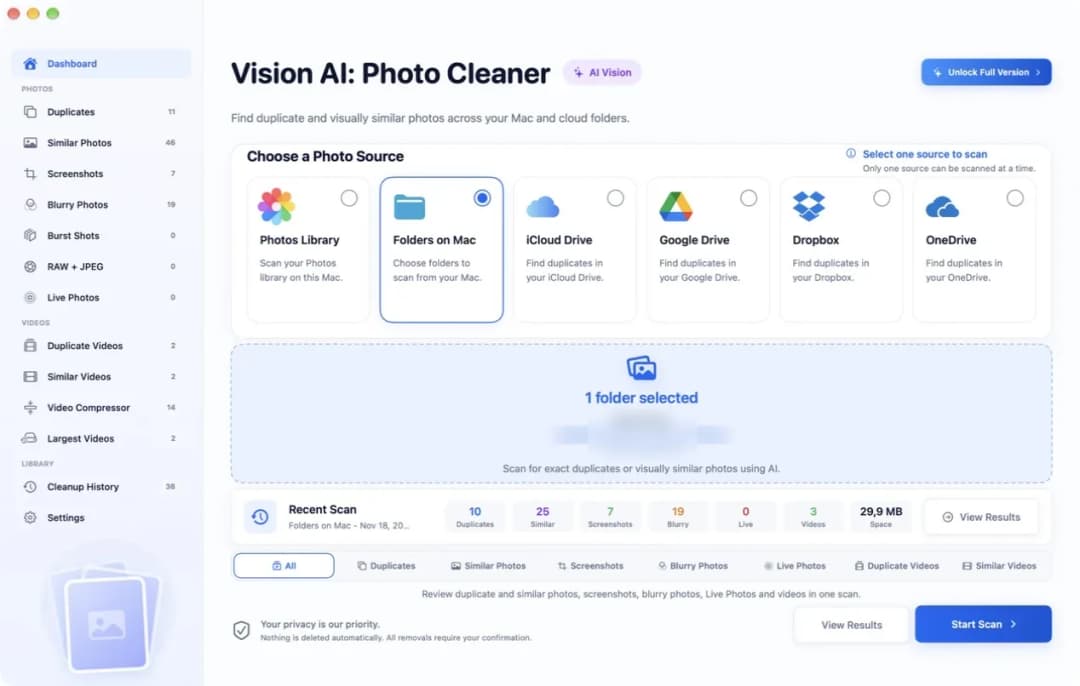
The second reason is the last step inside the Photos library. PhotoSweeper does not remove the marked photos there by itself. It puts them into an album in the Photos app, and you delete them there yourself. The third reason is the knobs. Many ways to compare and many rules are great for a photographer, but a lot to learn for a family photo box. A simpler helper first asks one thing: where are your photos? In Vision AI: Photo Cleaner you pick that at the top: Photos Library, Folders on Mac, iCloud Drive, Google Drive, Dropbox or OneDrive.
2. Vision AI: Photo Cleaner: look first, pay later or never
This is our own app, so read this part with that in mind. It runs on macOS 14.6 or later and looks only at photos and videos. Scanning and looking at every group is free. So you see what the app found in your own photos before you decide anything. To remove photos inside the app you need Premium. On the US Mac App Store it cost $5.99 a month, $19.99 a year or $29.99 one time.
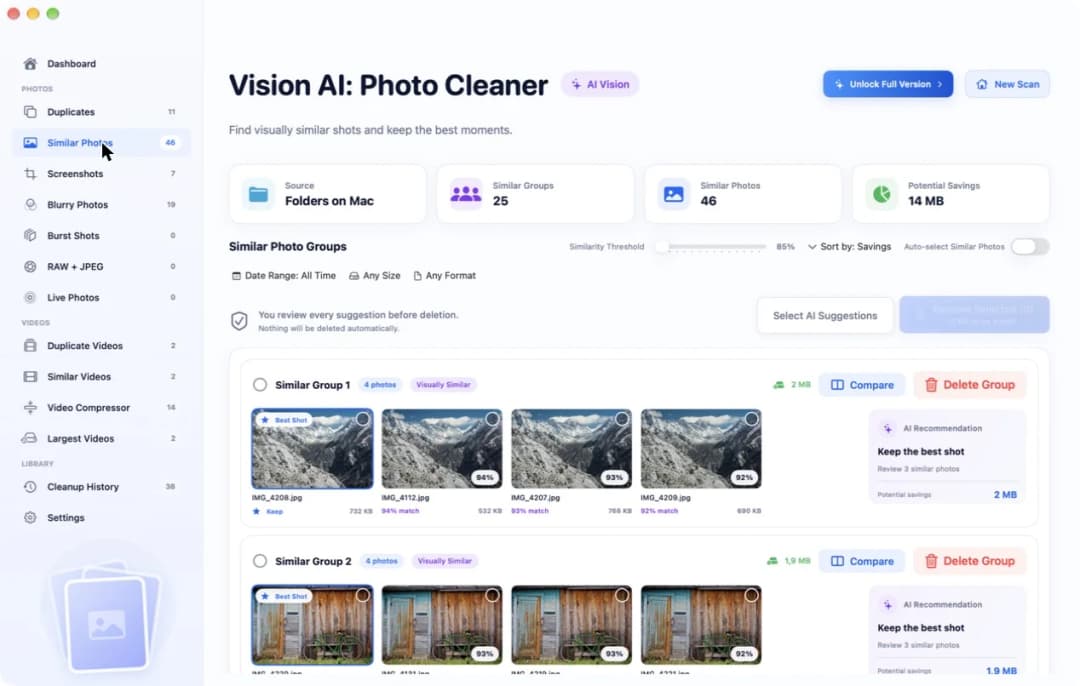
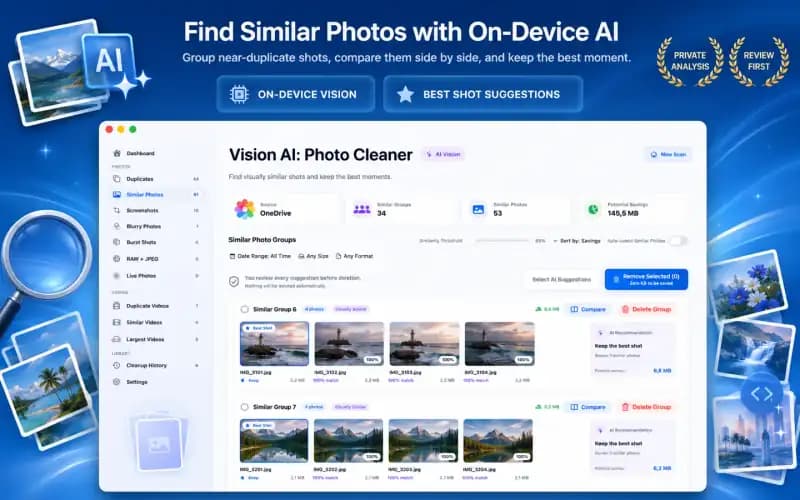
The app sorts what it finds into separate pages, so you do not need to set rules. Exact copies are on the Duplicates page. Photos that only look alike are on the Similar Photos page. A slider there, called Similarity Threshold, starts at 85%. If you raise it, only very close photos stay in one group. One photo in each group gets a small Best Shot label. Your photos are looked at on your Mac. The app does not upload them anywhere. What it cannot do: it does not open Lightroom Classic or Capture One catalogs, and it does not run on older systems.
3. The Photos app: free and already on your Mac
Before you install anything, open the Photos app. In the sidebar, under Utilities, there is an album called Duplicates. Photos puts copies side by side there. Click Merge, and Photos keeps one photo with the best quality and moves the others to Recently Deleted. They stay there for 30 days, so you can still get them back. This costs nothing.
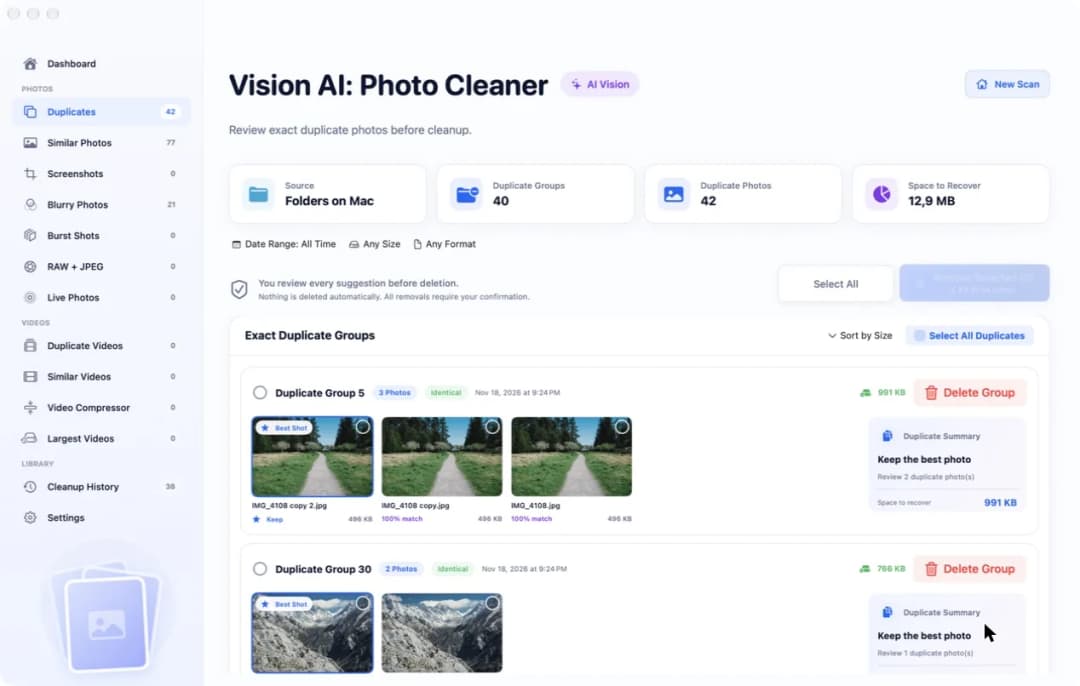
Photos has two limits. It knows only the photos inside its own library. A folder in Downloads or on an external drive is invisible to it until you import the pictures. And you cannot tell Photos how strict it should be. For folders and drives you need a helper that reads them directly. In Vision AI: Photo Cleaner you choose Folders on Mac and pick the folder. After the scan, the Duplicates page shows how many groups and photos it found and how much space they take.
4. Gemini 2 and dupeGuru: for mixed files and for a zero budget
Gemini 2 comes from MacPaw. It is a helper for the whole house, not only the photo box. It looks for copies of documents, music, installers and photos in one go. It has fewer photo knobs than PhotoSweeper, and it does not open Lightroom Classic or Capture One catalogs. On November 16, 2026 the trial from the MacPaw website scanned for free and removed up to 500 MB. After that it cost $44.95 one time. The Mac App Store version had a $19.99 a year plan.
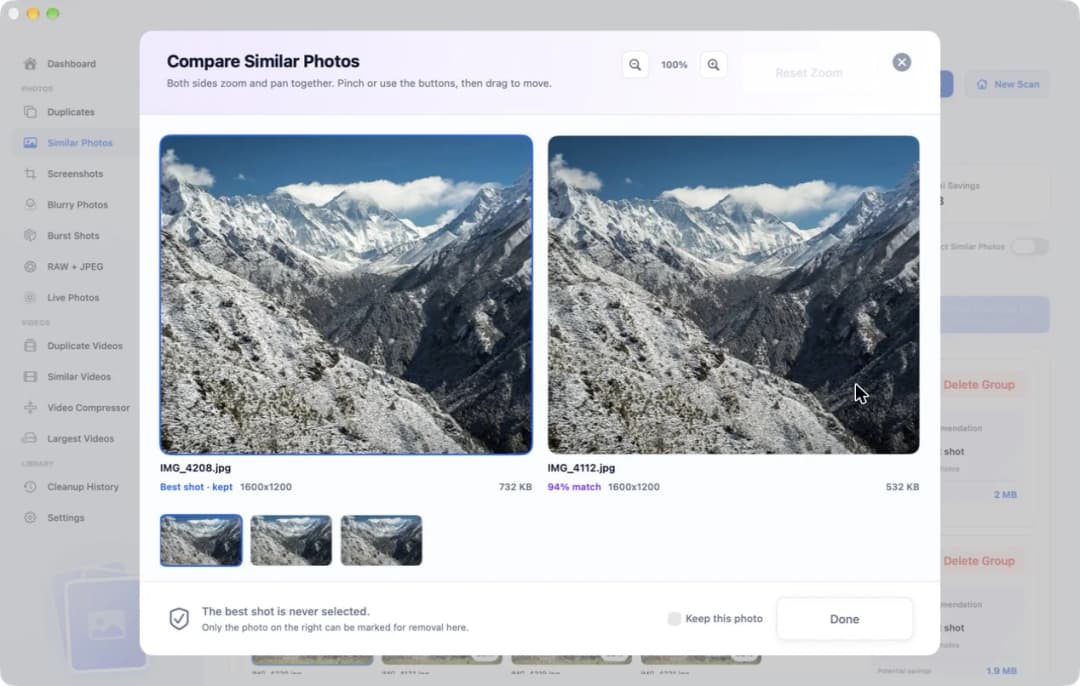
dupeGuru is free and open source. Its Standard mode finds files that are exactly the same. Its Picture mode finds images that look alike. It works on folders and external drives, not inside the Photos library. Its window is plain, and on a new Mac you may have to allow the app to open first. Whichever helper you pick, look closely before you let a photo go. In Vision AI: Photo Cleaner the Compare window puts two photos side by side. Both sides zoom and move together, so you always look at the same spot.
5. When PhotoSweeper is still the right helper
Sometimes the workbench with all the knobs is exactly what you need. Do you keep your photos in Lightroom Classic or Capture One? Then stay with PhotoSweeper. It can open these catalogs. Vision AI: Photo Cleaner, Gemini 2 and the Photos app cannot. Is your Mac older? PhotoSweeper runs on macOS 10.15 or later. Vision AI: Photo Cleaner needs macOS 14.6 or later.
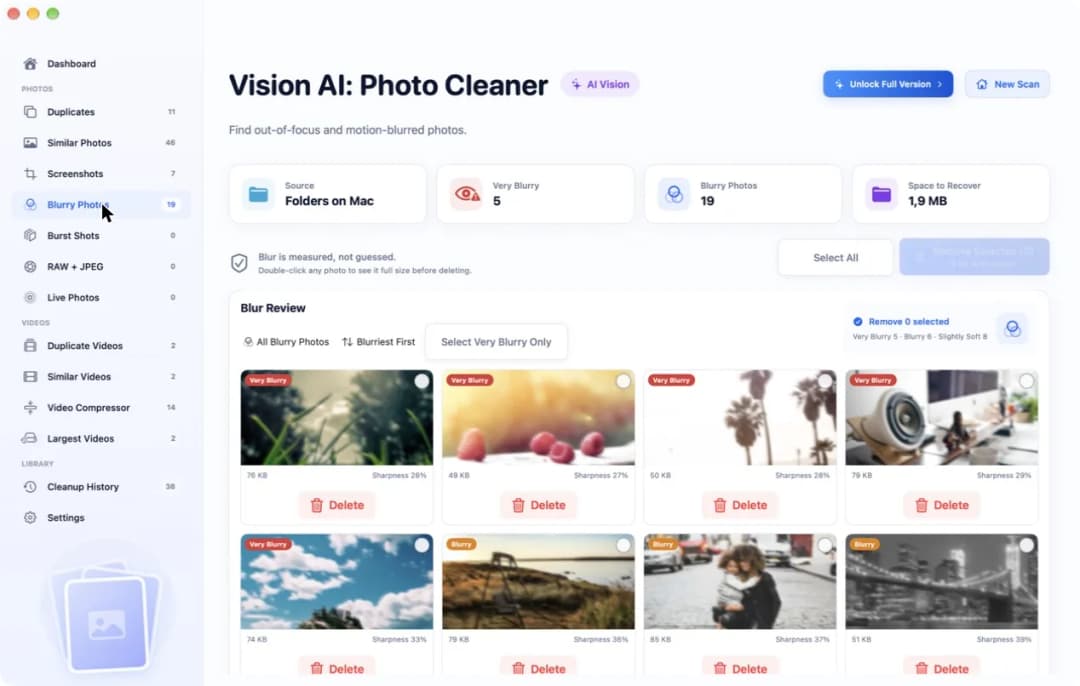
PhotoSweeper is also the right pick if you like to write your own rules, for example which photo of a pair should always stay. And it is a one-time price of $14.99 with no plan to renew. What it does not have is a page only for blurry photos. Vision AI: Photo Cleaner has one. It sorts unsharp photos into Very Blurry, Blurry and Slightly Soft, and shows a sharpness score under each picture. You can use both helpers: one for the catalog, one for the rest.
6. Try the new helper on a small pile first
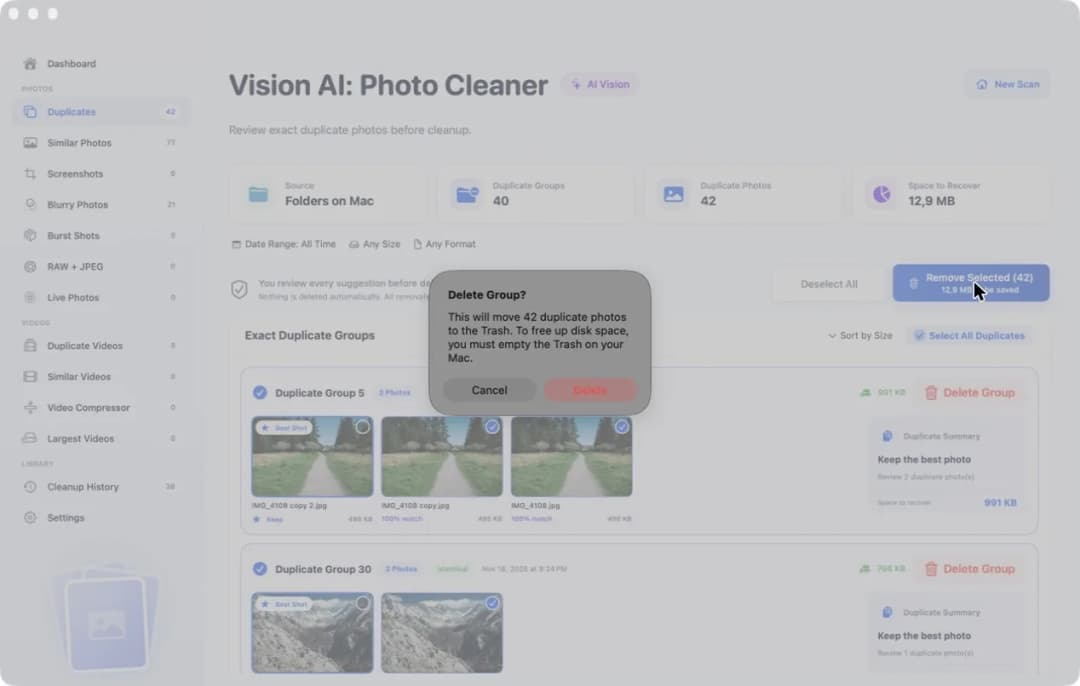
Do not let a new helper into the whole photo box at once. First make sure your backup is up to date. Then pick a small pile of 30 to 50 photos, with a few copies and a few look-alike shots in it. Let the app find the exact copies first. Look at the similar photos after that, as a second step, because there your own eyes have to decide.
Then remove one photo that does not matter and check where it went. Files from folders go to the Trash. Photos from the Photos library go to Recently Deleted. In Vision AI: Photo Cleaner a small window asks you once more before anything moves. And one warning for every app that works on folders: never point it at the Photos library file itself. That can break the library. Choose the Photos library inside the app instead.
How to pick a PhotoSweeper alternative for your photos
- 1
Say where your photos live
Photos library, plain folders, an external drive, or a Lightroom Classic or Capture One catalog. With a catalog, stay with PhotoSweeper.
- 2
Use the free tools first
Open the Duplicates album in the Photos app. For folders, scan for free with Vision AI: Photo Cleaner or dupeGuru and look at what they find.
- 3
Pick one app for the rest
Vision AI: Photo Cleaner for photos and videos on macOS 14.6 or later, Gemini 2 for mixed files, dupeGuru for free folder cleanup.
- 4
Test on a small pile
Scan 30 to 50 backed-up photos, remove one photo that does not matter, and check that you can get it back.
Frequently asked questions
What is a free PhotoSweeper alternative for Mac?▼
For photos inside the Photos library, the Duplicates album in the Photos app is free. For folders and external drives, dupeGuru is free and open source. In Vision AI: Photo Cleaner scanning and looking are free, and removing photos inside the app needs Premium.
Does PhotoSweeper have a free trial on the Mac App Store?▼
No. On November 16, 2026 it cost $14.99 one time on the US Mac App Store, and you pay before you can scan. Overmacs has a trial on its own website. That trial removes up to 10 photos each time you open the app.
Should I leave PhotoSweeper if I use Lightroom Classic or Capture One?▼
No. PhotoSweeper can open these catalogs. Vision AI: Photo Cleaner, Gemini 2 and the Photos app do not read them. You can keep PhotoSweeper for the catalog and use another helper for the Photos library or plain folders.
Does Vision AI: Photo Cleaner find more copies than PhotoSweeper?▼
We do not know, and we do not claim it. We did not run a race between the apps. Try both on the same small pile of your own photos and look at the groups each one shows.
What does PhotoSweeper do with marked photos in the Photos library?▼
According to the PhotoSweeper manual, it puts the marked photos into an album in the Photos app. You open that album and delete the photos there yourself. They then go to Recently Deleted and stay for 30 days.

A helper with fewer knobs
Vision AI: Photo Cleaner sorts copies, similar photos and blurry photos into separate pages on your Mac. Scanning and looking are free. You decide what goes.

Sources
Related guides

· 9 min read
5 Gemini 2 Alternatives for Mac Photo Cleanup
Looking for a Gemini 2 alternative for Mac photos? Compare Vision AI, Apple Photos, Finder, PhotoSweeper and dupeGuru by what they find and what they cost.

· 9 min read
Gemini 2 vs PhotoSweeper for Duplicate Photos on Mac
Gemini 2 vs PhotoSweeper on Mac: what each app finds, how it handles the Photos library and Lightroom, what it costs, and a free scan to try first.
· 9 min read
How to Compare Similar Photos on Mac
Compare similar photos on Mac side by side: find look-alike shots, zoom both at once, check sharpness, keep the best one and remove the rest safely.
Ready when you are
Download Vision AI - Photo Cleaner for Mac
Find duplicate and similar photos, review large videos and compress videos locally on your Mac. Choose what to keep and confirm every cleanup.
By using Vision AI - Photo Cleaner, you agree to our Terms of Use and Privacy Policy.