Gemini 2 by MacPaw vs PhotoSweeper: Which Duplicate Finder Fits Your Mac?
Gemini 2 by MacPaw vs PhotoSweeper: compare duplicate detection, photo libraries, pricing and safety, see who each suits, and when Vision AI fits better.

Gemini 2 by MacPaw and PhotoSweeper are two of the best-known duplicate finders on the Mac. They overlap on duplicate and similar photos, but they are built for different people. Gemini 2 is a general duplicate file finder that also handles photos and music. PhotoSweeper is a photo specialist that works inside Apple Photos, Lightroom Classic and Capture One.
This comparison is based on each app's Mac App Store listing and official website as of November 2, 2026. We did not benchmark detection accuracy or speed, and a feature missing from a listing is not proof the app lacks it. At the end we also describe Vision AI - Photo Cleaner, our own Mac app, and say plainly when one of the other two is the better choice.
Gemini 2 by MacPaw at a Glance
Gemini 2 comes from MacPaw, the company behind CleanMyMac. According to its Mac App Store listing, it finds duplicate files of any type, including documents, music and images, and can also find duplicate folders. It scans external drives and network volumes, finds duplicates and similar pictures in the Photos library, and spots duplicate and similar tracks in the Music library.
Gemini 2 can automatically select which copies to remove using Smart Selection rules, lets you restore a removed duplicate, move duplicates to another folder or drive, or replace copies with hard links. Its Duplicates Monitor watches your Mac or chosen folders for new duplicates. It is a free download with in-app purchases; on the US Mac App Store, Gemini 2 Yearly Access is $19.99 as of November 2, 2026.
PhotoSweeper at a Glance
PhotoSweeper, made by Overmacs (listed on the App Store under developer Maksym Cherniaiev), focuses only on photos and videos. Its listing says it works with Apple Photos, Lightroom Classic and Capture One, as well as images in any folder or on external drives. It has three search modes (Duplicates, Similar Photos and Series of Shots), an adjustable similarity threshold, and Auto Mark rules that choose which photo to keep in each group.
It can find edited, resized and rotated versions of the same image, supports video formats such as AVI, MKV and WMV, and includes AI-based photo quality scoring. Removal depends on the source: files go to the Trash, Photos items go to a special album, and Lightroom photos are marked as Rejected. PhotoSweeper costs $14.99 on the US Mac App Store as of November 2, 2026, and the developer offers a trial download on its website.
Side-by-Side Comparison (as of November 2, 2026)
The points below come from each app's App Store description and official website on that date. Check the current listings before you buy, because features and prices change.
- Main focus: Gemini 2 finds duplicate files of all types. PhotoSweeper is built for photo libraries.
- Apple Photos library: both apps scan it.
- Lightroom Classic and Capture One: PhotoSweeper supports both. Gemini 2's listing does not mention them.
- Music library: Gemini 2 finds duplicate and similar tracks. PhotoSweeper's listing does not mention music.
- Duplicate folders and any file type: Gemini 2 only.
- Similar photos: both apps detect them. PhotoSweeper adds a Series of Shots mode and a similarity slider.
- Automatic selection: Gemini 2 has Smart Selection rules; PhotoSweeper has Auto Mark rules.
- Ongoing monitoring: Gemini 2's Duplicates Monitor watches for new duplicates.
- Price: Gemini 2 is free to download with a $19.99 yearly plan on the US Mac App Store. PhotoSweeper is a $14.99 one-time purchase on the US Mac App Store.
- Privacy label: Gemini 2 lists Data Not Linked to You; check PhotoSweeper's current listing for its label.
- Minimum macOS on the Mac App Store: Gemini 2 lists macOS 10.13, PhotoSweeper lists macOS 10.15.
Who Should Choose Gemini 2
Gemini 2 is the better fit if your duplicates are not only photos. If you have copied folders, repeated downloads, duplicate documents or a messy Music library, a general file finder saves you from running several tools. The Duplicates Monitor also suits people who want to catch new copies as they appear.
Who Should Choose PhotoSweeper
PhotoSweeper is the better fit for photographers. If you work in Lightroom Classic or Capture One, its library integration means you can clean duplicates without exporting or reorganizing anything, and removals follow each app's own rules. Its fine-grained settings and Series of Shots mode help with large shoots, and a one-time App Store price may suit you better than a subscription.
A Third Option: Vision AI - Photo Cleaner
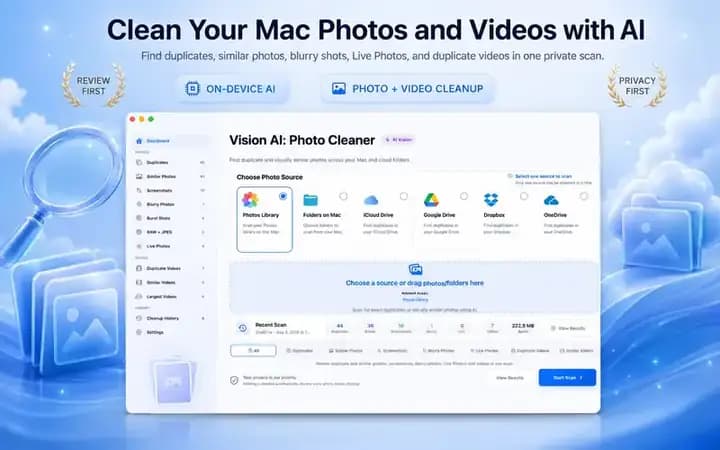
Vision AI - Photo Cleaner is our Mac app. It finds exact duplicate and similar photos, and also reviews blurry photos, screenshots, burst shots, Live Photos and RAW + JPEG pairs. It also finds duplicate and similar videos, lists your largest videos, and includes a video compressor that saves smaller copies or replaces originals only after the new file passes a safety check. Neither of the other two listings mentions video compression.
Analysis runs on your Mac; photos and videos are not uploaded to an external analysis server, and no account is required. It scans the Photos library, Mac folders, iCloud Drive and Finder folders synced by Google Drive, Dropbox or OneDrive. Nothing is removed automatically: local files go to the Trash and Photos items go to Recently Deleted. It requires macOS 14.6 or later and its App Store label is Data Not Collected. It is free to download; Premium on the US Mac App Store is $3.99 per month, $19.99 per year or $24.99 lifetime as of November 2, 2026.
Choose Vision AI if your storage problem is as much about videos as photos, or if you want one review-first tool for your whole media library. Choose PhotoSweeper if you depend on Lightroom Classic or Capture One, and Gemini 2 if you need to find duplicate documents, folders or music.
Pick the Right Duplicate Finder for Your Mac
- 1
List where your duplicates live
Note whether they are in Apple Photos, Lightroom, Capture One, folders, external drives or the Music library.
- 2
Decide what types you need
Photos only, photos and videos, or every file type including documents and music.
- 3
Check the listing and price
Compare one-time and subscription pricing and the minimum macOS version on the App Store.
- 4
Back up and review first
Make a backup, run a scan, and check each group before removing anything.

Clean Up Photos and Videos on Your Mac
Vision AI - Photo Cleaner finds duplicate and similar photos and videos on your Mac, analyzes them on the device and removes nothing until you confirm.

Frequently asked questions
Is Gemini 2 or PhotoSweeper better for photos?▼
For photo libraries, PhotoSweeper offers more photo-specific controls and works with Lightroom Classic and Capture One. Gemini 2 is broader and also finds duplicate documents, folders and music.
Does PhotoSweeper work with Lightroom?▼
Yes. PhotoSweeper works with Lightroom Classic. When you remove photos there, it marks them as Rejected and adds them to a special collection instead of deleting files directly.
Is Gemini 2 a one-time purchase?▼
Not on the US Mac App Store, where Gemini 2 is a free download with a $19.99 yearly plan as of November 2, 2026. MacPaw's website may offer other options, so check it for current pricing.
What is a good alternative to Gemini 2 and PhotoSweeper for videos?▼
Vision AI - Photo Cleaner finds duplicate and similar videos, lists your largest videos and can compress videos on your Mac, alongside duplicate and similar photo cleanup.
Do these apps delete photos permanently?▼
Not immediately. According to their listings, Gemini 2 lets you restore removed duplicates, and PhotoSweeper sends files to the Trash and Photos items to a special album. Vision AI moves local files to the Trash and Photos items to Recently Deleted.
Sources
Related guides
· 7 min read
How to Choose a Duplicate Photo Finder for Mac (2026 Evaluation Guide)
Compare duplicate photo finders for Mac and MacBook. Discover how to evaluate similarity detection, on-device privacy, and safe review workflows without risking photos.

· 9 min read
Are Mac Photo Cleaner Apps Safe? A Privacy Checklist
Before a duplicate photo finder scans your Mac, check these 8 things: privacy labels, Photos and folder access, cloud drives, network activity and safe deletion.

· 9 min read
How to Compress Videos on Mac: 4 Built-In and Free Ways
Compress videos on Mac with Photos, QuickTime Player, Finder or Vision AI. Compare quality options, keep your originals safe and free up storage.
Ready when you are
Download Vision AI - Photo Cleaner for Mac
Find duplicate and similar photos, review large videos and compress videos locally on your Mac. Choose what to keep and confirm every cleanup.
By using Vision AI - Photo Cleaner, you agree to our Terms of Use and Privacy Policy.