
Photos Cleaner - Cleanup Phone
Photos Cleaner - Cleanup Phone: แอปล้างเครื่อง iPhone สำหรับรูปภาพ วิดีโอ และรายชื่อพื้นที่มากขึ้น ความรกน้อยลง
ค้นหารูปซ้ำและรูปที่คล้ายกัน ล้างสกรีนช็อตเก่า ลดขนาดวิดีโอใหญ่ และรวมรายชื่อที่ซ้ำกัน ทุกอย่างวิเคราะห์บน iPhone ของคุณ และจะไม่มีอะไรถูกลบจนกว่าคุณจะยืนยัน
- วิเคราะห์บน iPhone
- คุณตรวจสอบก่อนลบทุกครั้ง
- ดาวน์โหลดฟรี


รูปที่คล้ายกัน
เก็บรูปที่ดีที่สุด แล้วปล่อยที่เหลือไป
รูปซ้ำ
รูปเดียวกันมีสามไฟล์? เก็บไว้หนึ่งพอ
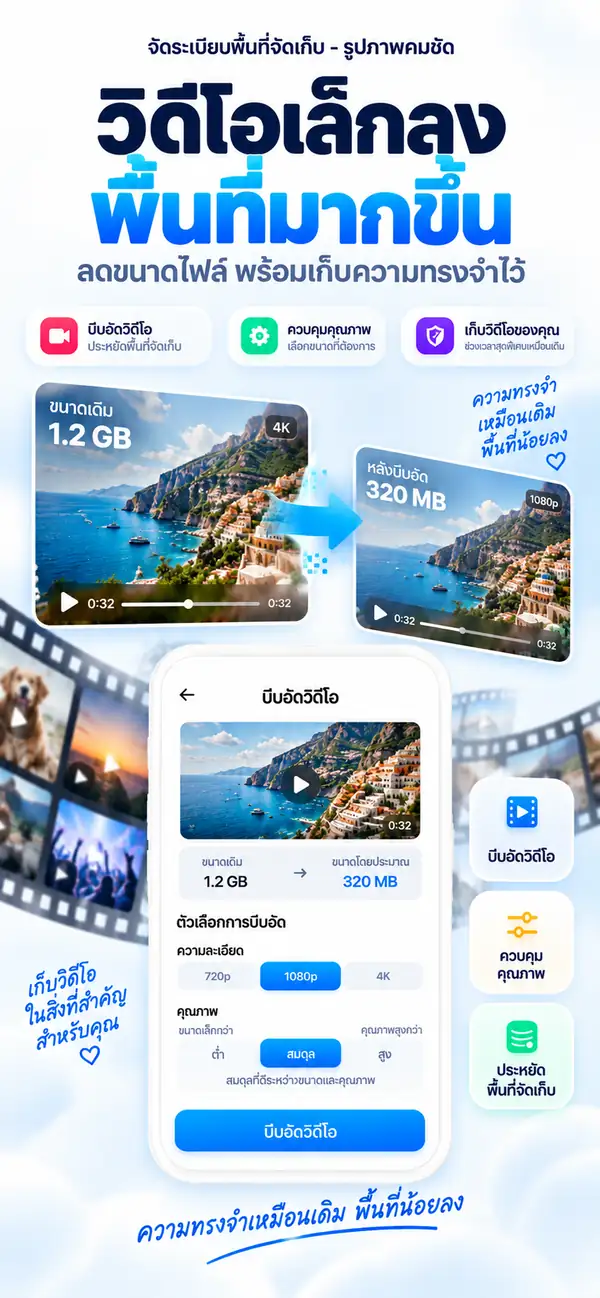
บีบอัดวิดีโอ
วิดีโอใหญ่ ไฟล์เล็กลง
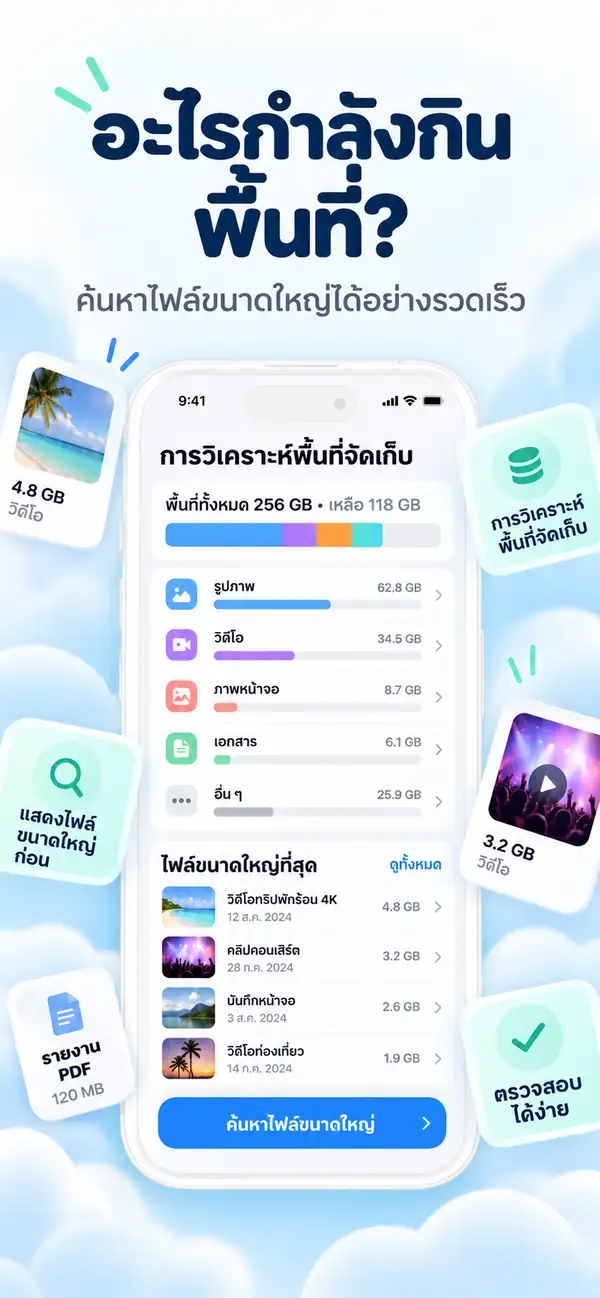
วิเคราะห์พื้นที่
ดูว่าอะไรกินพื้นที่ของคุณ
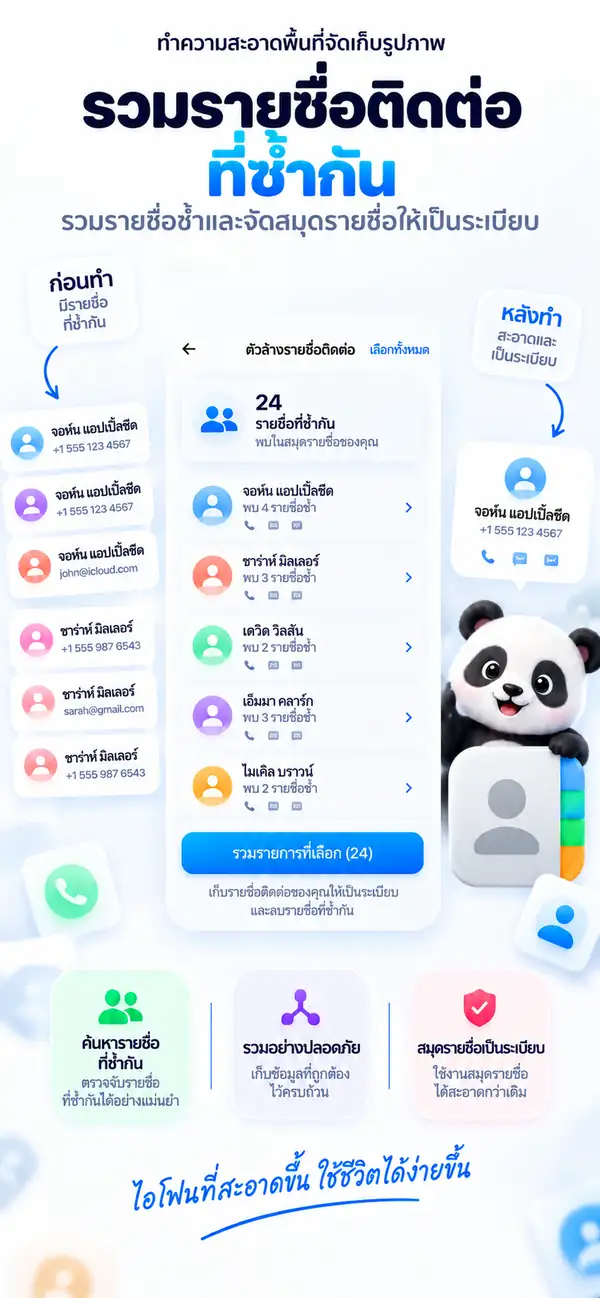
รายชื่อซ้ำ
หนึ่งคน หนึ่งรายชื่อ
- แพลตฟอร์ม
- iPhone, iPad
- ระบบขั้นต่ำ
- iOS 17.0 ขึ้นไป
- หมวดหมู่
- เครื่องมือ
- การประมวลผล
- สแกนรูปภาพและวิดีโอในเครื่อง
- ราคา
- ดาวน์โหลดฟรี (มีการซื้อภายในแอปแบบไม่บังคับ)
- ผู้พัฒนา
- DijitalWorlds (Cemal Hekimoglu)
- รูปที่คล้ายกัน
- บีบอัดวิดีโอ
- รายชื่อซ้ำ
- ล้างสกรีนช็อต
- ปัดเพื่อเคลียร์
ทำไม iPhone ถึงเต็ม
พื้นที่เต็มแทบไม่เคยเป็นเพราะไฟล์ใหญ่ไฟล์เดียว
แต่เป็นสิ่งที่สะสมเงียบ ๆ ทั้งรูปช่วงเวลาเดียวกันสิบรูป สกรีนช็อตที่ใช้ครั้งเดียว วิดีโอจากซัมเมอร์ที่แล้ว และรายชื่อที่บันทึกไว้สามครั้ง Photos Cleaner - Cleanup Phone ช่วยค้นหาความรกเหล่านี้และเคลียร์ได้ในไม่กี่นาที
ภาพถ่ายต่อเนื่องและถ่ายซ้ำ
รูปที่แทบเหมือนกันจากช่วงเวลาเดียวกัน
สกรีนช็อต
ใบเสร็จ ตั๋ว และโน้ตที่ไม่ต้องใช้แล้ว
วิดีโอขนาดใหญ่
คลิปที่กินพื้นที่หลาย GB แต่ทำให้เล็กลงได้อีกมาก
รูปที่คล้ายกัน
เก็บรูปที่ดีที่สุด แล้วปล่อยที่เหลือไป
Photos Cleaner - Cleanup Phone จัดกลุ่มรูปที่ถ่ายในช่วงเวลาเดียวกันและแนะนำรูปที่ดีที่สุดให้เก็บไว้ คุณเปรียบเทียบแบบเคียงข้างกันแล้วตัดสินใจเอง
- จัดกลุ่มภาพต่อเนื่อง ภาพถ่ายซ้ำ และเซลฟี่
- แนะนำรูปที่ดีที่สุดให้เก็บไว้
- ไม่มีอะไรถูกลบจนกว่าคุณจะแตะ

รูปซ้ำ
รูปเดียวกันมีสามไฟล์? เก็บไว้หนึ่งพอ
รูปที่ซ้ำกันทุกประการจะถูกจัดกลุ่มไว้ ให้คุณลบได้ในครั้งเดียวและเก็บไฟล์ต้นฉบับไว้เพียงไฟล์เดียว
- 1
ค้นหาไฟล์ที่ซ้ำกันทุกประการในคลังรูปภาพ
- 2
เก็บไว้หนึ่งไฟล์และเลือกที่เหลือ
- 3
รายการที่ลบจะไปอยู่ใน ที่เพิ่งลบ
บีบอัดวิดีโอ
วิดีโอใหญ่ ไฟล์เล็กลง
เลือกความละเอียดและระดับคุณภาพ ดูขนาดโดยประมาณ แล้วบีบอัด ความทรงจำยังอยู่ แต่ GB หายไป
- เลือก 720p, 1080p หรือ 4K
- ปรับสมดุลระหว่างขนาดและคุณภาพ
- ดูขนาดโดยประมาณก่อน
วิเคราะห์พื้นที่
ดูว่าอะไรกินพื้นที่ของคุณ
การแยกประเภทรูปภาพ วิดีโอ สกรีนช็อต และไฟล์ขนาดใหญ่อย่างชัดเจน ช่วยบอกว่าควรเริ่มจากตรงไหน เพื่อเคลียร์สิ่งที่ได้พื้นที่คืนมากที่สุดก่อน
- รูปภาพ
- วิดีโอ
- ไฟล์ขนาดใหญ่
- รายการซ้ำ
- สกรีนช็อต
- ว่าง
- ไฟล์ใหญ่ที่สุดแสดงก่อน
- เห็นทุกหมวดหมู่ในพริบตา
- เริ่มเคลียร์ได้ทันที
รายชื่อซ้ำ
หนึ่งคน หนึ่งรายชื่อ
Photos Cleaner - Cleanup Phone ค้นหารายชื่อซ้ำและคัดลอกข้อมูลที่ขาดไปยังบัตรรายชื่อหนึ่งใบ โดยเก็บบัตรต้นฉบับไว้ คุณตรวจสอบผลลัพธ์ก่อนยืนยันได้
- ตรวจพบรายการที่ซ้ำกัน
- เก็บบัตรรายชื่อต้นฉบับไว้
- ตรวจสอบก่อนรวมทุกครั้ง
เคลียร์ด่วน
เครื่องมือเล็ก ๆ ที่คืนพื้นที่ได้มาก
- 01
ล้างสกรีนช็อต
ดูสกรีนช็อตทั้งหมดในที่เดียว เลือกอันที่ไม่ต้องใช้แล้ว และลบพร้อมกัน

- 02
ปัดเพื่อเคลียร์
ไล่ดูรูปทีละรูป ปัดเพื่อเก็บหรือลบ และย้อนกลับได้ทุกเมื่อ

- 03
รูปจากแชท
ค้นหารูปและไฟล์ที่บันทึกจากแชท แล้วเคลียร์ทีละหลายรายการ

ความเป็นส่วนตัว
รูปของคุณ ยังเป็นของคุณ
การสแกนและการวิเคราะห์ทำบน iPhone ของคุณ รูปภาพ วิดีโอ และรายชื่อจะไม่ถูกอัปโหลดไปประมวลผล และแอปใช้งานได้โดยไม่ต้องเชื่อมต่ออินเทอร์เน็ต
วิเคราะห์ในเครื่อง
สแกนรูปภาพ วิดีโอ และรายชื่อภายในเครื่อง
คุณเป็นคนตัดสินใจ
คำแนะนำเป็นเพียงคำแนะนำ คุณยืนยันการลบทุกครั้ง
ปลอดภัยตั้งแต่การออกแบบ
รูปที่ลบจะไปอยู่ใน ที่เพิ่งลบ ซึ่งยังกู้คืนได้
รวมถึง
ทุกอย่างที่ช่วยให้คลังรูปภาพเป็นระเบียบ

ตรวจจับรูปเบลอ
ค้นหารูปที่ไม่ชัดหรือสั่นไหว
ตรวจดูไฟล์ขนาดใหญ่
หาไฟล์และวิดีโอที่ใหญ่ที่สุดได้อย่างรวดเร็ว
เครื่องมือ Live Photos
แปลง Live Photos เป็นภาพนิ่งเพื่อประหยัดพื้นที่
ใช้งานออฟไลน์ได้
เคลียร์พื้นที่ได้โดยไม่ต้องใช้อินเทอร์เน็ต
ทีละขั้นตอน
วิธีจัดการ iPhone ด้วย Photos Cleaner - Cleanup Phone ใน 10 ขั้นตอนง่าย ๆ
ถ้าพื้นที่ใกล้เต็ม นี่คือวิธีที่ง่ายและเป็นระเบียบที่สุดในการจัดการรูป วิดีโอ สกรีนช็อต และรายชื่อ
- 1
สแกนคลังทั้งหมดก่อน
เริ่มจากการสแกนทั้งคลังเพื่อดูว่ารูป วิดีโอ สกรีนช็อต และรายชื่อส่วนไหนกินพื้นที่มากที่สุด
- 2
ไล่ดูรูปที่คล้ายกัน
เลือกเก็บรูปที่ดีที่สุด แล้วปล่อยรูปที่ใกล้เคียงกันเกินไปออกไป
- 3
ลบรูปซ้ำจริง ๆ
ถ้าเป็นไฟล์ซ้ำแบบตรง ๆ ก็เช็กเร็ว ๆ แล้วลบเป็นชุดได้เลย
- 4
เริ่มจากวิดีโอใหญ่
จัดการไฟล์ที่กินพื้นที่มากก่อน จะเห็นผลเรื่องพื้นที่ชัดที่สุด
- 5
วิดีโอที่ยังอยากเก็บให้บีบอัด
วิดีโอใหญ่ที่ยังต้องใช้ ไม่จำเป็นต้องลบทิ้งเสมอไป แค่ลดขนาดก็ช่วยได้
- 6
รวมรายชื่อที่ซ้ำกัน
รวมการ์ดรายชื่อที่ซ้ำ ให้สมุดรายชื่อดูสะอาดขึ้น
- 7
ลบสกรีนช็อตเก่า
สกรีนช็อตที่กองไว้นาน ๆ มักเป็นตัวกินพื้นที่แบบไม่รู้ตัว
- 8
เก็บกวาดรูปที่ไม่ค่อยได้ใช้
รูปเบลอ รูปพลาด หรือรูปที่ไม่ค่อยมีความหมาย สามารถทยอยเอาออกได้
- 9
ก่อนลบเช็กอีกครั้ง
ก่อนยืนยัน ลองดูรายการที่เลือกไว้รอบสุดท้ายอีกที
- 10
ทำซ้ำทุกไม่กี่สัปดาห์
ถ้ากลับมาเช็กสั้น ๆ เป็นระยะ พื้นที่ก็จะไม่กลับมาเต็มเร็วเกินไป
เปรียบเทียบฟีเจอร์
แอปรูปภาพของ Apple เทียบกับ Photos Cleaner - Cleanup Phone
แอปรูปภาพตรวจหารายการซ้ำได้ตั้งแต่ iOS 16 ส่วน Photos Cleaner - Cleanup Phone มีเครื่องมือเฉพาะสำหรับล้างสื่อและรายชื่อ เพื่อเพิ่มพื้นที่บน iPhone
| ฟีเจอร์ | แอปรูปภาพ (ในตัว) | Photos Cleaner - Cleanup Phone |
|---|---|---|
| ตรวจหารูปซ้ำทุกประการ | มี (อัลบั้มรายการซ้ำตั้งแต่ iOS 16) | มี (สแกนในเครื่องอย่างรวดเร็ว) |
| รูปที่คล้ายกัน | จัดกลุ่มพื้นฐานเท่านั้น | เปรียบเทียบภาพต่อเนื่องและรูปที่คล้ายกันแบบเคียงข้าง |
| รูปเบลอ | ไม่มี | คัดรูปที่ไม่ชัดเพื่อตรวจดูอย่างรวดเร็ว |
| บีบอัดวิดีโอ | ไม่มี (ต้องใช้เครื่องมือภายนอก) | บีบอัดวิดีโอในเครื่องเพื่อลดขนาดไฟล์ |
| รายชื่อซ้ำ | รายการซ้ำพื้นฐานในแอปรายชื่อ | ล้างรายชื่อโดยรวมรายการที่ซ้ำกัน |
| สกรีนช็อตเก่า | แสดงสกรีนช็อตทั้งหมดโดยไม่กรองตามอายุ | กรองตามอายุและขนาด |
| การลบอย่างปลอดภัย | ย้ายไปที่ ที่เพิ่งลบ (กู้คืนได้ใน 30 วัน) | ย้ายไปที่ ที่เพิ่งลบ (30 วัน และไม่มีการลบอัตโนมัติ) |
ความโปร่งใสและแซนด์บ็อกซ์ของ iOS
สิ่งที่ Photos Cleaner - Cleanup Phone ล้างได้และล้างไม่ได้บน iPhone
สถาปัตยกรรมความปลอดภัยของ iOS ปกป้องบางส่วนของระบบไว้ นี่คือรายละเอียดว่าการสแกนในเครื่องของเราจัดการอะไรได้อย่างปลอดภัย และอะไรที่แซนด์บ็อกซ์ของ iOS ไม่ให้แอปใดใน App Store เข้าถึง
รูปที่ซ้ำกันทุกประการ
รองรับค้นหารูปที่เหมือนกันในทุกอัลบั้มด้วยการเทียบในเครื่องอย่างรวดเร็ว
รูปที่คล้ายกันและภาพถ่ายต่อเนื่อง
รองรับวิเคราะห์องค์ประกอบและมุมภาพ จัดกลุ่มภาพถ่ายซ้ำ และแนะนำรูปที่ดีที่สุด
รูปเบลอและรูปคุณภาพต่ำ
รองรับประเมินความคมชัดในเครื่อง เพื่อเคลียร์รูปที่ใช้ไม่ได้อย่างรวดเร็ว
บีบอัดวิดีโอขนาดใหญ่
รองรับค้นหาวิดีโอที่ใหญ่ที่สุดและบีบอัดในเครื่อง
สกรีนช็อตและการบันทึกหน้าจอเก่า
รองรับคัดสกรีนช็อตที่ไม่ใช้แล้วและการบันทึกหน้าจอที่กินพื้นที่
รายชื่อซ้ำ
รองรับรวมรายชื่อที่มีเบอร์ ชื่อ หรืออีเมลเดียวกันให้เป็นรายการเดียว
แคชของแอปอื่น (LINE, TikTok, Instagram)
iOS ปกป้องไว้แซนด์บ็อกซ์ของ iOS ไม่ให้แอปหนึ่งแก้ไขพื้นที่ส่วนตัวของอีกแอป ให้ล้างข้อมูลเหล่านี้จากการตั้งค่าของแอปนั้นเอง
ข้อมูลระบบและบันทึกของ iOS
iOS ปกป้องไว้ข้อมูลระบบจัดการโดย iOS เท่านั้น และจะถูกล้างเองเมื่อจำเป็น ไม่มีแอปใดใน App Store ลบแคชระบบได้
เร่ง RAM
iOS เป็นผู้จัดการiOS คืนหน่วยความจำให้อัตโนมัติเมื่อเปิดแอป คำโฆษณาของแอปล้าง RAM เป็นเพียงการตลาด Photos Cleaner - Cleanup Phone เน้นที่พื้นที่จัดเก็บจริง
คำถามที่พบบ่อย
รวมคำถามที่พบบ่อยเกี่ยวกับความเป็นส่วนตัว การเคลียร์พื้นที่ รูปซ้ำ การบีบอัดวิดีโอ และการทำงานของ Photos Cleaner - Cleanup Phone บน iPhone
Photos Cleaner - Cleanup Phone ปลอดภัยไหม?
ปลอดภัย Photos Cleaner - Cleanup Phone สแกนบนเครื่องและให้คุณตรวจสอบก่อนลบทุกครั้ง คุณเป็นผู้เลือกว่าจะลบอะไร และรูปภาพ วิดีโอ และรายชื่อติดต่อจะไม่ถูกอัปโหลดเพื่อประมวลผล
ทำไมพื้นที่ iPhone ถึงเต็มเร็ว?
ส่วนใหญ่เกิดจากรูปที่ซ้ำกัน การถ่ายรัว และวิดีโอที่ไม่ได้บีบอัด แอปของเราจะช่วยจัดการไฟล์เหล่านี้
บีบอัดวิดีโอแล้วคุณภาพจะเสียไหม?
เราใช้อัลกอริทึมอัจฉริยะที่ลดขนาดลงได้สูงสุด 70% โดยที่สายตามนุษย์แทบไม่เห็นความต่างบนหน้าจอมือถือ
กู้คืนรูปที่ลบไปได้ไหม?
ได้! รูปจะไปอยู่ในอัลบั้ม 'ลบเมื่อเร็วๆ นี้' ในแอป Photos ของระบบ คุณมีเวลา 30 วันในการกู้คืน
Photos Cleaner - Cleanup Phone
ให้ iPhone ของคุณได้หายใจ
เพิ่มพื้นที่สำหรับรูปใหม่ แอปที่คุณใช้ และอัปเดต iOS ที่คุณเลื่อนมาตลอด

ดาวน์โหลดฟรี มีการสมัครสมาชิกแบบรายสัปดาห์ รายเดือน และรายปีให้เลือกผ่านการซื้อภายในแอปของ Apple ราคาและเงื่อนไขการทดลองใช้จะแสดงเป็นสกุลเงินท้องถิ่นของคุณใน App Store ชื่อเดิมคือ iCleaner Panda
ในการใช้งาน Photos Cleaner - Cleanup Phone คุณตกลงยอมรับ ข้อกำหนดการใช้งาน และ นโยบายความเป็นส่วนตัว.