
Photo Cleaner - Storage Space
Photo Cleaner - Storage Space: 사진, 영상, 연락처를 정리하는 아이폰 클리너공간은 더 넓게. 어수선함은 더 적게.
중복 사진과 비슷한 사진을 찾고, 오래된 스크린샷을 정리하고, 큰 영상을 줄이고, 중복 연락처를 합치세요. 모든 분석은 iPhone에서 이루어지며, 직접 확인하기 전에는 아무것도 삭제되지 않습니다.

- iPhone에서 분석
- 삭제 전 직접 확인
- 무료 다운로드



비슷한 사진
가장 좋은 사진만 남기고, 나머지는 보내세요.
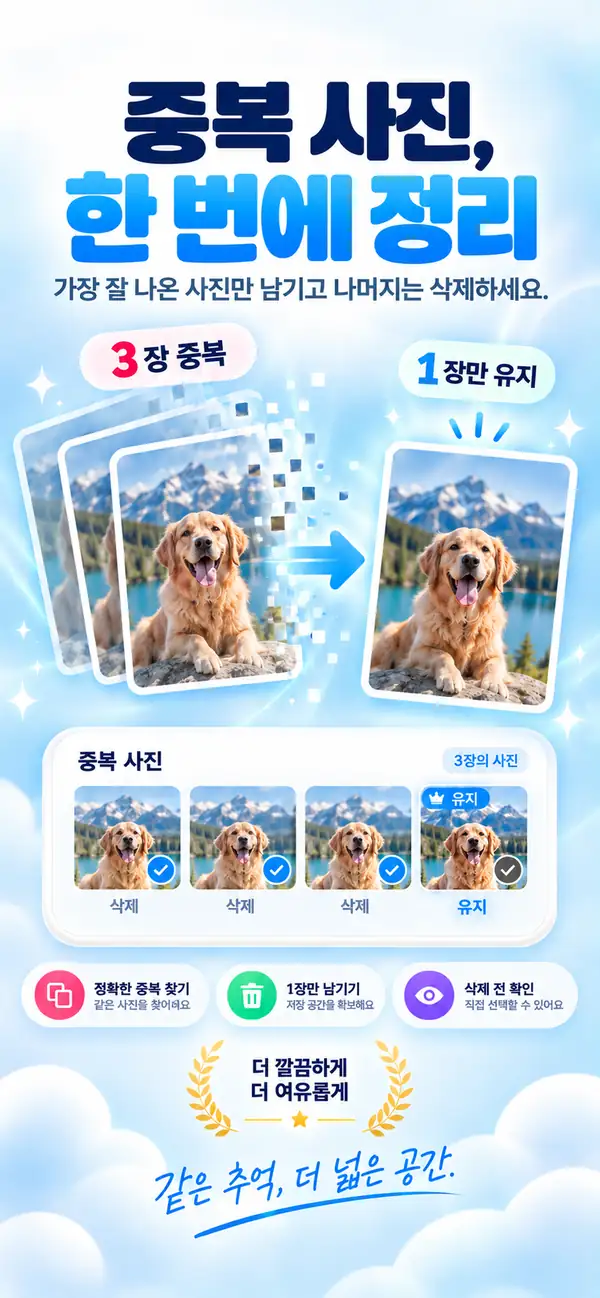
중복 사진
같은 사진이 세 장? 한 장이면 충분합니다.
영상 압축
큰 영상을, 더 작은 파일로.
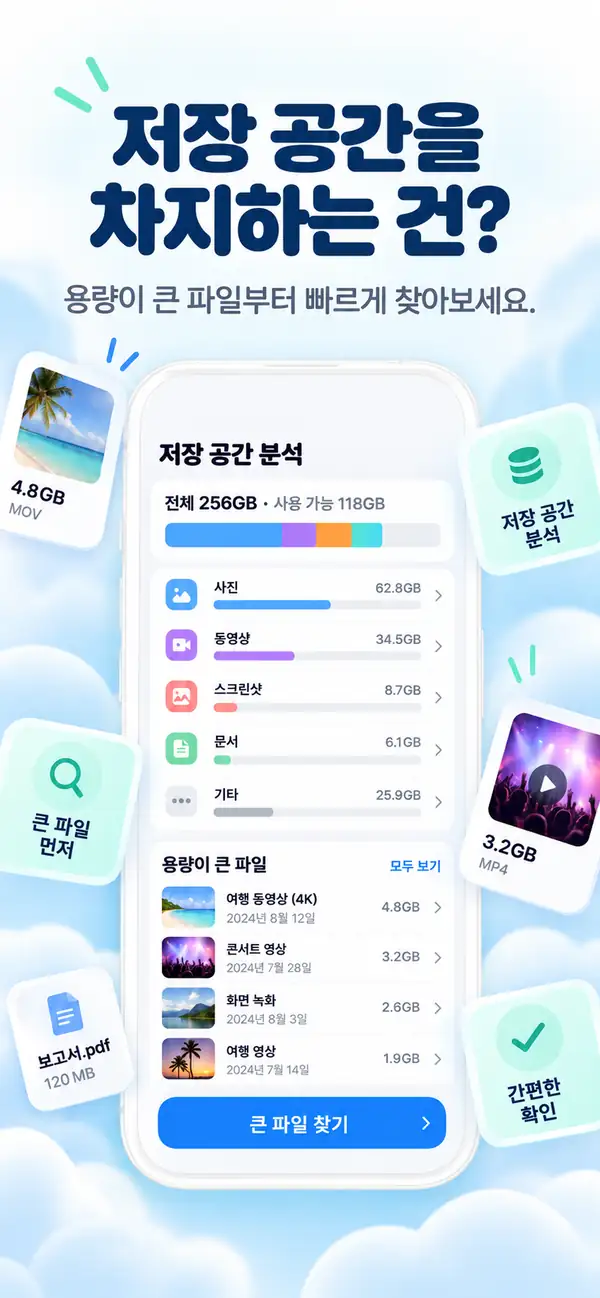
저장 공간 분석
무엇이 공간을 차지하는지 확인하세요.
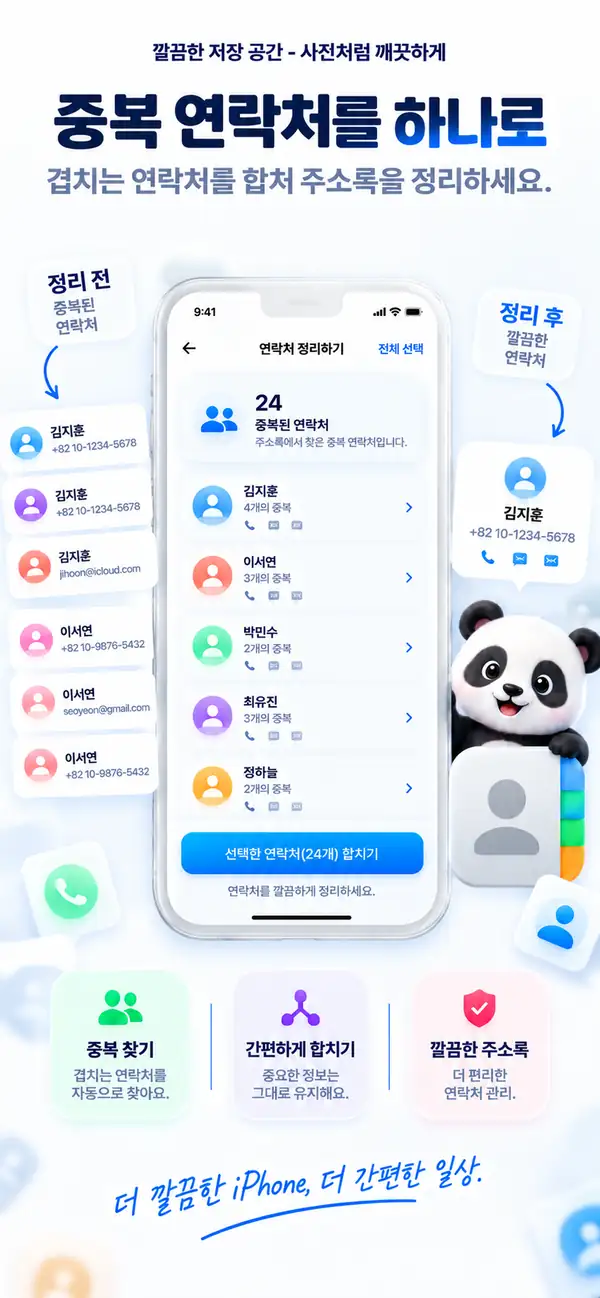
중복 연락처
한 사람에게는, 연락처 하나.
- 플랫폼
- iPhone, iPad
- 최소 OS
- iOS 17.0 이상
- 카테고리
- 유틸리티
- 처리 방식
- 기기 내 사진 및 영상 스캔
- 가격
- 무료 다운로드 (선택적 앱 내 구입)
- 개발자
- DijitalWorlds (Cemal Hekimoglu)
- 비슷한 사진
- 영상 압축
- 중복 연락처
- 스크린샷 정리
- 스와이프 정리
아이폰이 가득 차는 이유
저장 공간은 한 가지 큰 것 때문에 부족해지는 경우가 드뭅니다.
같은 순간을 찍은 열 장의 사진, 한 번 쓰고 만 스크린샷, 지난여름 영상, 세 번 저장된 연락처처럼 조용히 쌓인 것들 때문이죠. Clean Up Storage가 이런 잡동사니를 찾아 몇 분 만에 정리하도록 도와줍니다.
연속 촬영과 재촬영
같은 순간을 담은 거의 똑같은 사진.
스크린샷
더 이상 필요 없는 영수증, 티켓, 메모.
큰 영상
기가바이트를 차지하지만 훨씬 작아질 수 있는 클립.
비슷한 사진
가장 좋은 사진만 남기고, 나머지는 보내세요.
Clean Up Storage는 같은 순간에 찍은 사진을 묶고 남길 사진을 추천합니다. 나란히 비교한 뒤 직접 결정하세요.
- 연속 촬영, 재촬영, 셀카를 묶어서 표시
- 남길 최고의 사진을 추천
- 직접 탭하기 전에는 삭제되지 않음
중복 사진
같은 사진이 세 장? 한 장이면 충분합니다.
완전히 같은 사진을 묶어 주기 때문에 한 번에 정리하고 원본 한 장만 남길 수 있습니다.
- 1
라이브러리의 완전 중복 사진 탐지
- 2
한 장은 남기고 나머지를 선택
- 3
삭제한 항목은 최근 삭제된 항목으로 이동
영상 압축
큰 영상을, 더 작은 파일로.
해상도와 화질을 고르고 예상 크기를 확인한 뒤 압축하세요. 추억은 그대로, 용량만 줄어듭니다.
- 720p, 1080p, 4K 중 선택
- 크기와 화질의 균형 조절
- 예상 크기를 먼저 확인
저장 공간 분석
무엇이 공간을 차지하는지 확인하세요.
사진, 영상, 스크린샷, 가장 큰 파일을 한눈에 나눠 보여 주어 어디서부터 정리하면 좋을지 알 수 있습니다.
- 사진
- 영상
- 큰 파일
- 중복
- 스크린샷
- 남은 공간
- 가장 큰 파일부터 표시
- 카테고리를 한눈에
- 바로 정리 시작
중복 연락처
한 사람에게는, 연락처 하나.
Clean Up Storage는 여러 번 저장된 연락처를 찾아 하나로 합쳐 연락처 목록을 깔끔하게 유지합니다.
- 중복된 항목 감지
- 하나의 연락처로 병합
- 병합 전에 직접 확인
빠른 정리
작은 도구로 큰 공간을 확보하세요.
- 01
스크린샷 정리
모든 스크린샷을 한곳에서 보고, 필요 없는 것을 골라 한 번에 삭제하세요.

- 02
스와이프 정리
사진을 한 장씩 넘겨 보세요. 스와이프로 남기거나 지우고, 언제든 실행 취소할 수 있습니다.

- 03
채팅 사진
채팅에서 저장한 이미지와 파일을 찾아 한꺼번에 정리하세요.

개인정보 보호
내 사진은 내 것으로.
스캔과 분석은 iPhone에서 이루어집니다. 사진, 영상, 연락처는 처리를 위해 업로드되지 않으며, 인터넷 연결 없이도 앱을 사용할 수 있습니다.
기기 내 분석
사진, 영상, 연락처 스캔은 기기 안에서 진행됩니다.
결정은 내가
추천은 추천일 뿐입니다. 모든 삭제는 직접 확인합니다.
안전한 설계
삭제한 사진은 최근 삭제된 항목으로 이동해 다시 복구할 수 있습니다.
그 밖에도
라이브러리를 깔끔하게 유지하는 나머지 기능.

흐린 사진 감지
초점이 맞지 않거나 흔들린 사진을 찾아요.
큰 파일 검토
가장 큰 파일과 영상을 빠르게 찾아요.
Live Photos 도구
Live Photos를 정지 사진으로 바꿔 공간을 아껴요.
오프라인 작동
정리에 인터넷 연결이 필요 없어요.
단계별 안내
Photo Cleaner - Storage Space으로 아이폰 정리하는 10단계
저장 공간이 빠듯할 때 사진, 영상, 스크린샷, 연락처를 무리 없이 정리하는 가장 쉬운 흐름을 담았습니다.
- 1
라이브러리를 스캔하세요
먼저 전체 스캔을 돌려서 사진, 영상, 스크린샷, 연락처 중 무엇이 공간을 차지하는지 확인합니다.
- 2
비슷한 사진을 골라보세요
거의 같은 사진들 가운데 정말 남기고 싶은 한 장만 고릅니다.
- 3
완전히 같은 사진은 지우세요
똑같은 복사본은 빠르게 확인한 뒤 한 번에 정리합니다.
- 4
큰 영상부터 보세요
저장 공간을 많이 먹는 영상부터 처리하면 체감이 빠릅니다.
- 5
남길 영상은 압축하세요
지우기 아까운 큰 영상은 삭제 대신 용량만 줄입니다.
- 6
중복 연락처를 합치세요
같은 사람의 연락처가 여러 장이면 하나로 정리합니다.
- 7
오래된 스크린샷을 치우세요
다시 볼 일 없는 스크린샷을 정리해 공간을 되찾습니다.
- 8
애매한 사진은 덜어내세요
흐리거나 잘못 찍힌 사진을 빼면 앨범 보기가 훨씬 편해집니다.
- 9
삭제 전에 한 번 더 확인하세요
마지막으로 선택한 항목을 빠르게 다시 봅니다.
- 10
몇 주마다 반복하세요
짧게라도 주기적으로 정리하면 저장 공간이 다시 무너지지 않습니다.
기능 비교
Apple 사진 앱과 Photo Cleaner - Storage Space 비교
사진 앱은 iOS 16부터 중복 항목을 찾아 줍니다. Photo Cleaner - Storage Space는 아이폰 저장 공간 확보를 위한 미디어와 연락처 정리 도구를 제공합니다.
| 기능 | Apple 사진 앱 (기본) | Photo Cleaner - Storage Space |
|---|---|---|
| 완전 중복 감지 | 지원 (iOS 16 이상 중복 항목 앨범) | 지원 (기기 내 빠른 스캔) |
| 비슷한 사진 | 기본 그룹화만 지원 | 연속 촬영과 비슷한 사진을 나란히 비교 |
| 흐린 사진 | 지원 안 함 | 선명하지 않은 사진을 골라 빠르게 검토 |
| 영상 압축 | 지원 안 함 (타사 도구 필요) | 기기 내 영상 압축으로 파일 크기 축소 |
| 중복 연락처 | 연락처 앱의 기본 중복 목록 | 중복을 합치는 연락처 정리 |
| 오래된 스크린샷 | 기간 필터 없이 모두 표시 | 기간과 크기로 필터링 |
| 안전한 삭제 | 최근 삭제된 항목으로 이동 (30일간 복구 가능) | 최근 삭제된 항목으로 이동 (30일간 복구 가능, 자동 삭제 없음) |
투명성과 iOS 샌드박스
Photo Cleaner - Storage Space가 아이폰에서 정리할 수 있는 것과 없는 것
iOS 보안 구조는 시스템의 일부 영역을 보호합니다. 기기 내 스캔이 안전하게 처리하는 것과, iOS 샌드박스 때문에 어떤 App Store 앱도 접근할 수 없는 것을 정확히 정리했습니다.
완전히 같은 중복 사진
지원빠른 기기 내 대조로 모든 앨범에서 동일한 이미지를 찾습니다.
비슷한 사진과 연속 촬영
지원구도와 각도를 분석해 반복 촬영을 묶고 가장 좋은 사진을 추천합니다.
흐리거나 품질이 낮은 사진
지원기기에서 선명도를 평가해 쓸 수 없는 사진을 빠르게 정리합니다.
큰 영상 압축
지원가장 큰 영상을 찾아 기기에서 압축합니다.
오래된 스크린샷과 화면 기록
지원필요 없어진 스크린샷과 용량이 큰 화면 기록을 골라냅니다.
중복 연락처
지원번호, 이름, 이메일이 같은 연락처를 하나로 합칩니다.
다른 앱의 캐시 (카카오톡, TikTok, Instagram 등)
iOS가 보호iOS 샌드박스는 한 앱이 다른 앱의 저장 공간을 수정하지 못하게 막습니다. 각 앱의 설정에서 정리하세요.
시스템 데이터와 iOS 로그
iOS가 보호시스템 데이터는 iOS만 관리하며 필요할 때 스스로 비웁니다. App Store 앱은 시스템 캐시를 삭제할 수 없습니다.
RAM 정리
iOS가 관리iOS는 앱을 열 때 메모리를 자동으로 비웁니다. RAM 클리너의 주장은 마케팅일 뿐이며, Photo Cleaner - Storage Space는 실제 저장 공간에 집중합니다.
자주 묻는 질문
개인정보 보호, 저장 공간 정리, 중복 사진, 영상 압축, 그리고 Photo Cleaner - Storage Space의 작동 방식에 대한 자주 묻는 질문입니다.
Photo Cleaner - Storage Space은 안전한가요?
네. Photo Cleaner - Storage Space은 기기에서 스캔하고, 삭제하기 전에 모든 항목을 직접 확인하도록 설계되었습니다. 무엇을 지울지는 사용자가 결정하며, 사진, 동영상, 연락처는 처리를 위해 업로드되지 않습니다.
왜 iPhone 공간이 이렇게 부족한가요?
보통 중복 사진, 연사 사진, 압축되지 않은 대용량 비디오 등이 원인입니다. Photo Cleaner - Storage Space은 이런 파일들을 찾아 안전하게 정리하도록 도와줍니다.
비디오 압축 시 화질이 떨어지나요?
스마트 압축 알고리즘을 사용하여 모바일 화면상으로는 차이를 느끼기 어려운 수준의 화질을 유지하면서 용량을 최대 70%까지 줄입니다.
실수로 삭제한 사진을 복구할 수 있나요?
네! 삭제된 사진은 iPhone의 '최근 삭제된 항목' 앨범으로 이동하며, 30일 이내에 복구할 수 있습니다.