
01
ตรวจรายการซ้ำใน Apple Photos
เปิดแอปรูปภาพ ขยายยูทิลิตี้ แล้วเลือกรายการซ้ำ macOS สามารถรวมรายการที่ตรวจพบแล้วในคลังรูปภาพได้

Vision AI - Photo Cleaner
macOS · ใหม่ใน 1.4.2
ค้นหารูปซ้ำและรูปคล้าย ตรวจสอบวิดีโอขนาดใหญ่ และบีบอัดวิดีโอใน Mac ของคุณ เลือกไฟล์ที่ต้องการเก็บและยืนยันก่อนล้างทุกครั้ง
คู่มือรูปซ้ำบน Mac
ใช้เครื่องมือในแอปรูปภาพเมื่อต้องการรวมเฉพาะรายการซ้ำที่ตรวจพบแล้ว ใช้ Vision AI: Photo Cleaner เมื่อต้องการเปรียบเทียบรูปที่คล้ายกัน สแกนโฟลเดอร์ หารูปเบลอหรือวิดีโอ และตรวจพื้นที่จัดเก็บที่ซิงก์ไว้ในที่เดียว
เปิดแอปรูปภาพ ขยายยูทิลิตี้ แล้วเลือกรายการซ้ำ macOS สามารถรวมรายการที่ตรวจพบแล้วในคลังรูปภาพได้
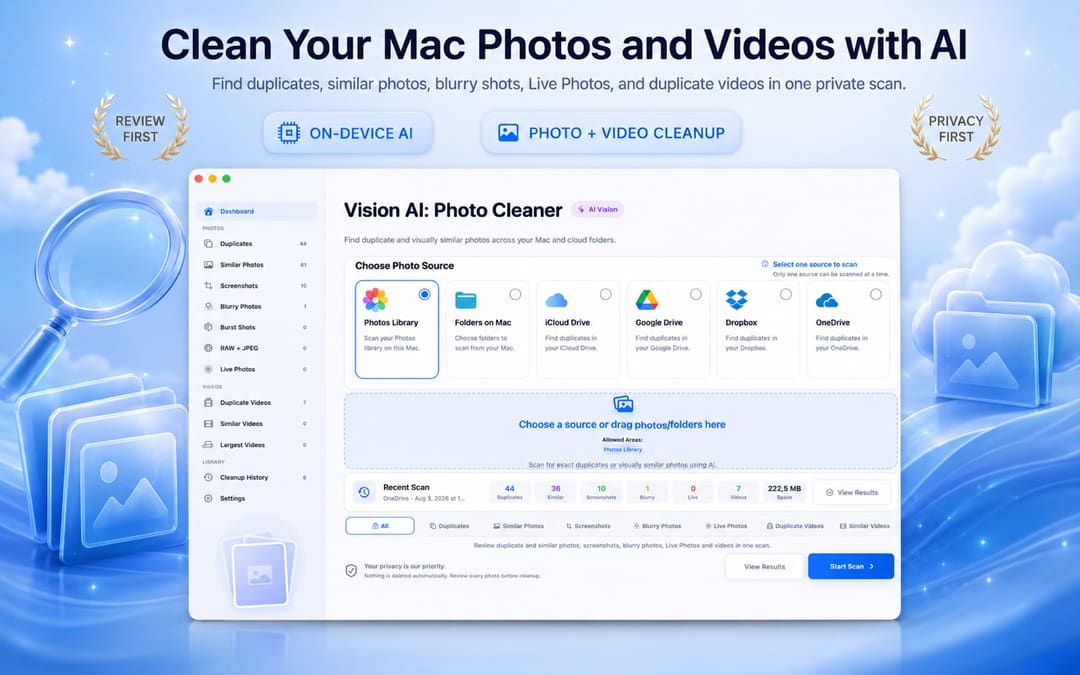
เลือกคลังรูป โฟลเดอร์ใน Mac หรือโฟลเดอร์ที่ซิงก์และรองรับ Vision AI จะจัดกลุ่มสำเนาที่เหมือนกันและรูปที่ดูคล้ายกันภายใน Mac
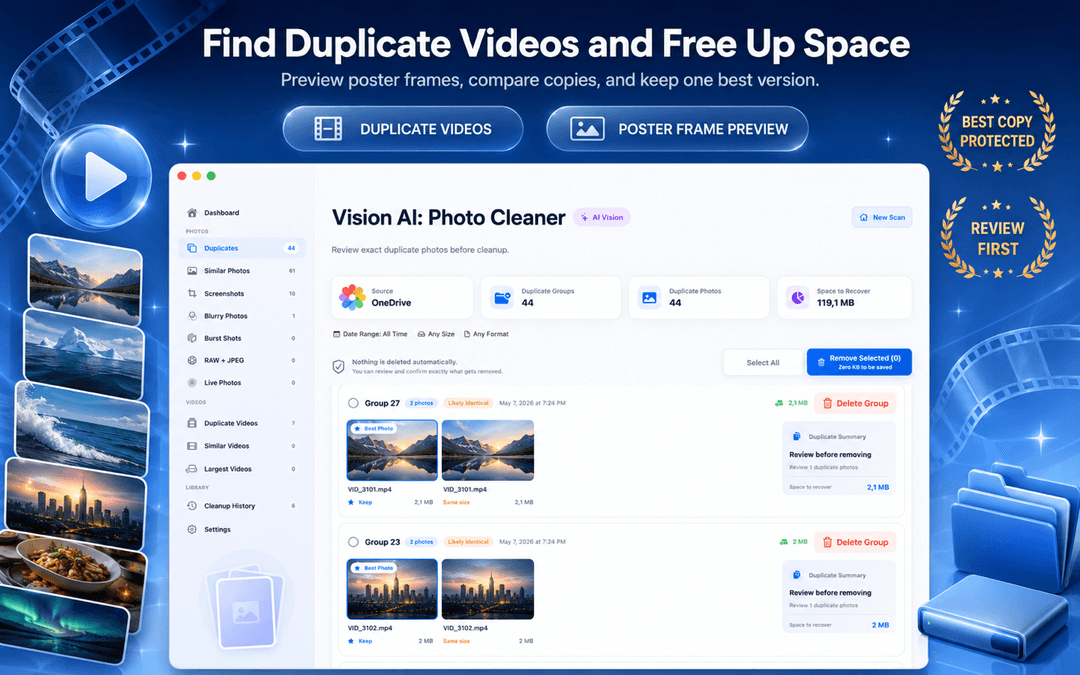
ตรวจภาพตัวอย่าง วันที่ ขนาด และข้อมูลคุณภาพ เก็บเวอร์ชันที่ดีที่สุด แล้วส่งเฉพาะไฟล์ที่เลือกไปยังถังขยะ
ค้นหารูปซ้ำและรูปคล้าย ตรวจสอบวิดีโอขนาดใหญ่ และบีบอัดวิดีโอใน Mac ของคุณ เลือกไฟล์ที่ต้องการเก็บและยืนยันก่อนล้างทุกครั้ง
เวอร์ชัน 1.4.2 รองรับ 10 ภาษา: อังกฤษ ตุรกี สเปน ฝรั่งเศส เยอรมัน อิตาลี โปรตุเกส ญี่ปุ่น เกาหลี และอาหรับ
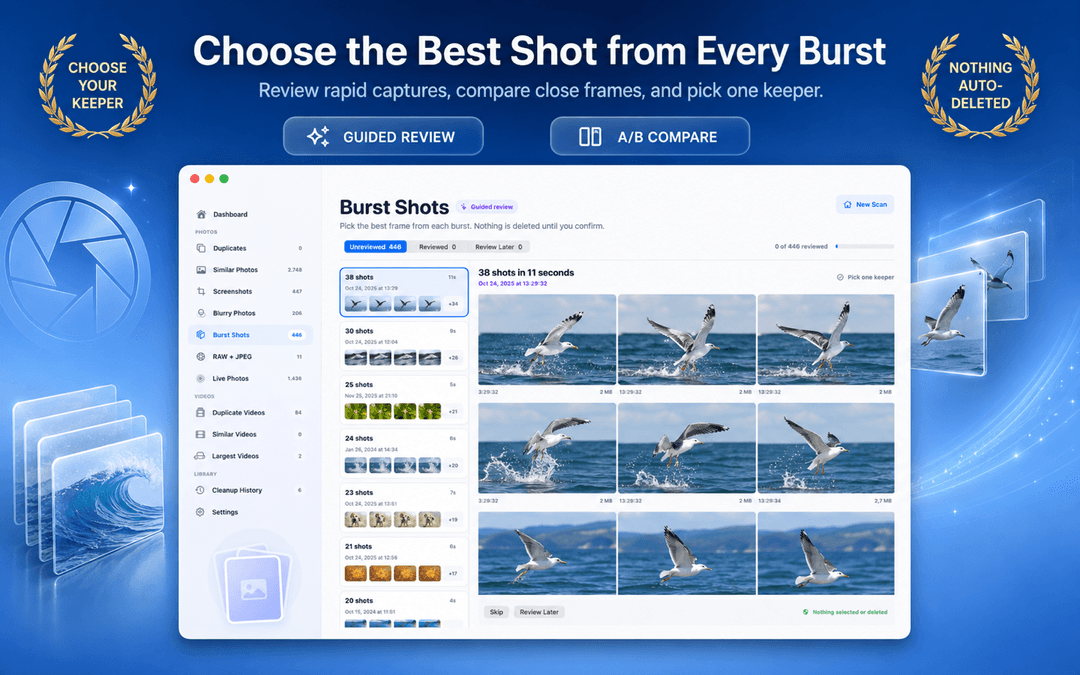
แอปแยกความคืบหน้า กลุ่มที่พบ ตัวอย่าง และการลบออกจากกัน ทำให้การล้างรู้สึกควบคุมได้
เลือกโฟลเดอร์ในเครื่อง คลังรูปภาพ หรือไดรฟ์ที่เชื่อมต่อ
Vision AI จัดกลุ่มรูปซ้ำ รูปคล้าย และภาพหน้าจอบน Mac ของคุณ
เก็บเวอร์ชันที่ดีที่สุด แล้วส่งรายการที่เลือกไปถังขยะเมื่อพร้อม

Vision AI: Photo Cleaner ออกแบบมาเพื่อการวิเคราะห์ในเครื่อง จึงไม่ต้องอัปโหลดคลังรูปของคุณ
การเปรียบเทียบและจัดกลุ่มรูปทำบนอุปกรณ์ของคุณ
ไม่มีสิ่งใดถูกลบโดยไม่มีการตรวจสอบและคำสั่งจากคุณ
ขั้นตอนหลักใช้งานได้โดยไม่ต้องสมัคร
รายการที่เลือกสามารถส่งไปถังขยะเพื่อให้ macOS กู้คืนได้
macOS Photos includes a basic Duplicates album for exact matches. Vision AI expands that into a full Mac photo workspace covering Finder folders, external SSDs, similar burst shots, and large video files.
| Cleanup Capability | Apple Photos (Built-in) | Vision AI: Photo Cleaner |
|---|---|---|
| Exact Duplicate Detection | Yes (the Photos app library only) | Yes (Photos library + Finder folders + external drives) |
| Similar & Burst Photo Grouping | Basic duplicate grouping; misses similar angles and lighting variants | Deep on-device visual similarity + keeper recommendation + sync zoom |
| Blurry & Low-Quality Detection | Not available | On-device Laplacian sharpness scoring isolates unusable shots |
| External SSD & Drive Scanning | Must import files into Photos library first | Directly scans connected external hard drives, SD cards, and USB drives |
| Cloud Folder Sync Scanning | iCloud Photos only | Scans local sync mirrors for iCloud Drive, Google Drive, Dropbox, OneDrive |
| Video Cleanup & Compressor | Basic video duplicates only (no compression) | Finds duplicate/large videos with built-in macOS video compressor |
| Safe Deletion Protocol | Recently Deleted (30-day recovery) | Mac Trash (until emptied) or Recently Deleted (up to 30 days), review-first |
Basic photo finders only compare file sizes or names. Vision AI uses four on-device analysis stages powered by macOS and Apple Silicon.
SHA-256 hashes are computed locally to identify exact file matches, including files with different names or locations.
On-device neural vision vectors extract scene geometry, lighting, and expressions. Bursts and alternate takes are clustered accurately without cloud servers.
Within each group of similar shots, sharpness, exposure, and detail are scored to recommend the best keeper, making review fast and effortless.
Motion-blurred and out-of-focus photos are detected through local Laplacian variance scoring, isolating unusable photos taking up disk space.
Vision AI scans local folders and volumes you select on your Mac, including local synced folders managed by macOS File Provider (such as iCloud Drive, Google Drive for Desktop, Dropbox, and OneDrive). It operates directly through standard macOS file access without requiring third-party OAuth logins or account credentials, inspecting only files that have been downloaded to your disk.
Select any source in your Mac workflow for instant inspection:
While Vision AI focuses on your photo and video libraries, Smart Cleaner AI scans your entire Mac storage for app caches, system logs, leftover files from uninstalled apps, developer build clutter, and files taking up disk space.
Related Mac & Photo Storage Guides
ไม่ แอปจะจัดกลุ่มรายการที่พบและรอให้คุณตรวจสอบ
ไม่ ผลิตภัณฑ์นี้ออกแบบมาสำหรับการวิเคราะห์ Vision AI ในเครื่องบน macOS
ได้ มีมุมมองแยกสำหรับรูปซ้ำ รูปคล้าย และภาพหน้าจอ
โฟลเดอร์ในเครื่องและแหล่งที่เชื่อมต่อ เช่น iCloud, Google Drive, Dropbox และ OneDrive
สำหรับรายการที่ตรวจพบแล้ว ให้เปิดรูปภาพ > ยูทิลิตี้ > รายการซ้ำ หากต้องการสแกนให้กว้างขึ้น Vision AI: Photo Cleaner จะจัดกลุ่มรูปซ้ำ รูปที่คล้ายกัน ภาพหน้าจอ รูปเบลอ วิดีโอ และโฟลเดอร์ที่รองรับ หลังตรวจสอบแล้ว ระบบจะย้ายเฉพาะรายการที่คุณเลือกไปยังถังขยะ
ควรมีการวิเคราะห์บนอุปกรณ์ โหมดจับคู่ทั้งแบบตรงกันและคล้ายกันทางภาพ การดูตัวอย่างเคียงข้างกัน รองรับตำแหน่งที่เก็บรูป และขั้นตอนที่ให้ตรวจสอบก่อนโดยไม่ลบอัตโนมัติ
แอปออกแบบมาให้สแกนคลังรูปและโฟลเดอร์ที่เข้าถึงได้ในเครื่องหรือซิงก์ไว้ รวมถึงแหล่ง iCloud ที่รองรับ ไฟล์ต้องเข้าถึงได้จาก Mac เพื่อวิเคราะห์ในเครื่อง
ลดขนาดวิดีโอด้วยตัวเลือกคุณภาพและความละเอียด บันทึกสำเนาที่บีบอัดในโฟลเดอร์แยก หรือแทนที่ต้นฉบับหลังจากวิดีโอใหม่ผ่านการตรวจสอบความปลอดภัยแล้วเท่านั้น การประมวลผลทำบน Mac ของคุณ
ค้นหารูปซ้ำและรูปคล้าย ตรวจสอบวิดีโอขนาดใหญ่ และบีบอัดวิดีโอใน Mac ของคุณ เลือกไฟล์ที่ต้องการเก็บและยืนยันก่อนล้างทุกครั้ง