أداة مجانية للبحث عن الصور المكررة على Mac: ما يجب التحقق منه قبل الثقة
قد تفرض بعض الأدوات المجانية رسوماً عند الحذف أو ترفع الصور للمقارنة. إليك ما ينبغي التحقق منه قبل اختيار أداة مجانية.


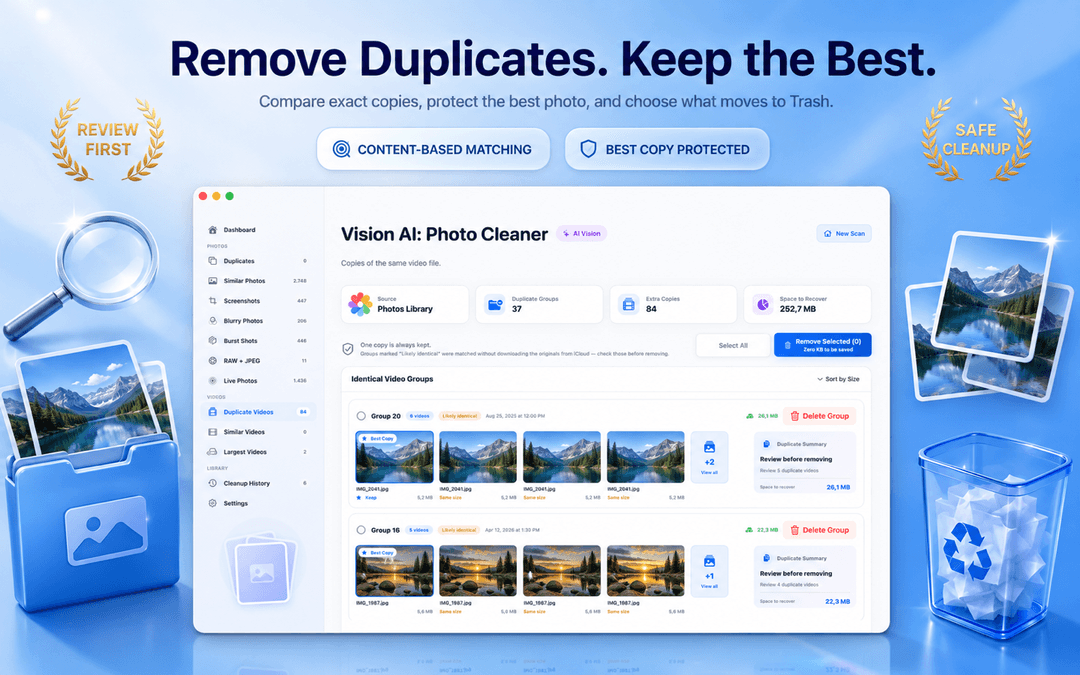
برنامج مجاني للبحث عن الصور المكررة على Mac: تنظيف آمن للصور بدون تكاليف خفية
قد يكون العثور على برنامج مجاني للبحث عن الصور المكررة على Mac أمرًا محبطًا. تتيح لك العديد من الأدوات الفحص مجانًا، ولكنها تطلب فجأة اشتراكًا مدفوعًا بمجرد أن ترغب في حذف الصور المكررة على Mac فعليًا. كما تعرّض برامج أخرى خصوصيتك للخطر عبر رفع الصور المصغرة إلى خوادم سحابية.
تطبيق Vision AI - Photo Cleaner هو أداة مجانية حقيقية لـ تنظيف الصور المكررة على Mac متاحة على Mac App Store. يفحص التطبيق مكتبة صور Apple ومحركات أقراص MacBook والمجلدات السحابية المتزامنة بالكامل على جهازك، مما يتيح لك التخلص من الصور المكررة على Mac بدون جدران دفع خفية.
ما يجب أن يقدمه برنامج البحث عن المكررات المجاني الحقيقي على Mac
الفخ الشائع: الفحص مجاني، لكن حذف الصور المكررة مدفوع
الفحص المجاني الذي يكتشف 1,000 صورة مكررة لا فائدة منه إذا كانت إزالتها تتطلب عملية شراء داخل التطبيق. تستخدم العديد من أدوات تنظيف Mac هذا الأسلوب المضلل.
مع Vision AI - Photo Cleaner، يمكنك فحص مكتبة صور Apple بالكامل أو مجلدات Finder، ومقارنة الصور جنبًا إلى جنب مع تكبير متزامن، وحذف الصور المكررة إلى سلة المهملات مجانًا.
الخصوصية على الجهاز: لماذا يجب ألا تغادر صورك جهاز Mac أبدًا
تقوم بعض تطبيقات التنظيف برفع الصور المصغرة إلى خوادم سحابية لإجراء المقارنة البصرية. هذا يشكل خطرًا كبيرًا على خصوصية مكتبات الصور الشخصية والحساسة.
يعمل Vision AI بالكامل محليًا على macOS باستخدام المحرك العصبي Neural Engine من Apple. سواء كنت تستخدم MacBook Air أو MacBook Pro أو iMac أو Mac Studio، فإن صورك تظل خاصة بنسبة 100% على جهازك.
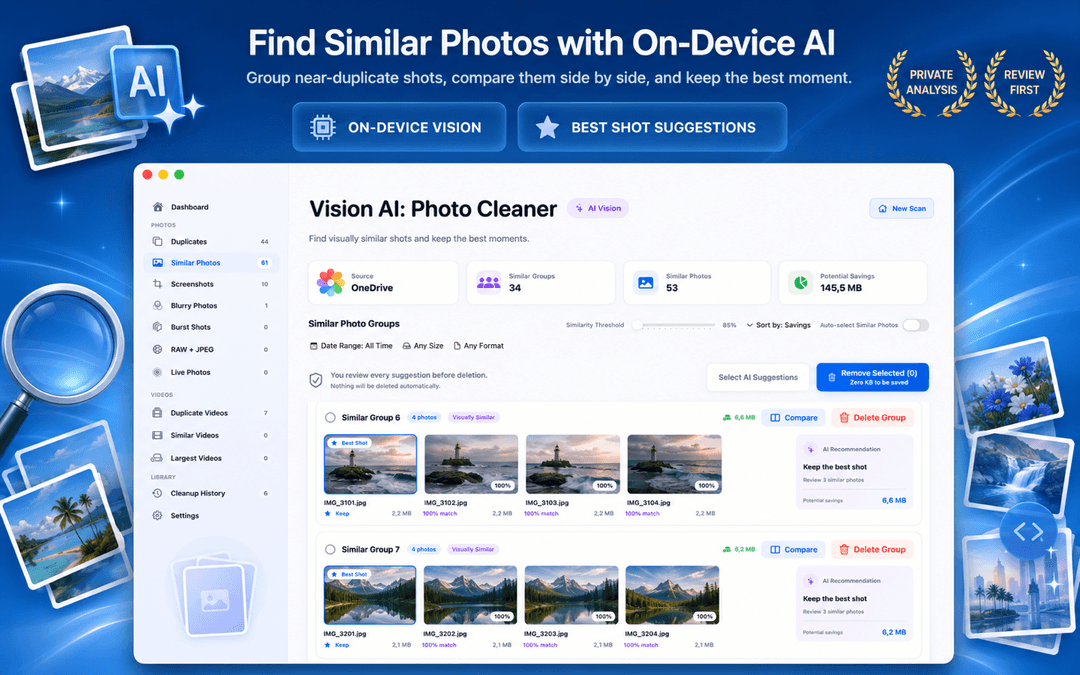
دعم مكتبة صور Apple ومجلدات Mac والمحركات السحابية
يجب ألا يقتصر برنامج البحث عن الصور المكررة على Mac على الملفات المنفصلة على سطح المكتب فحسب. يجب أن يقرأ مكتبة صور Apple الأصلية مباشرة ويفحص المجلدات المحلية المتزامنة مع iCloud Drive وGoogle Drive وDropbox وOneDrive لإزالة التكرارات عبر جميع أماكن التخزين.
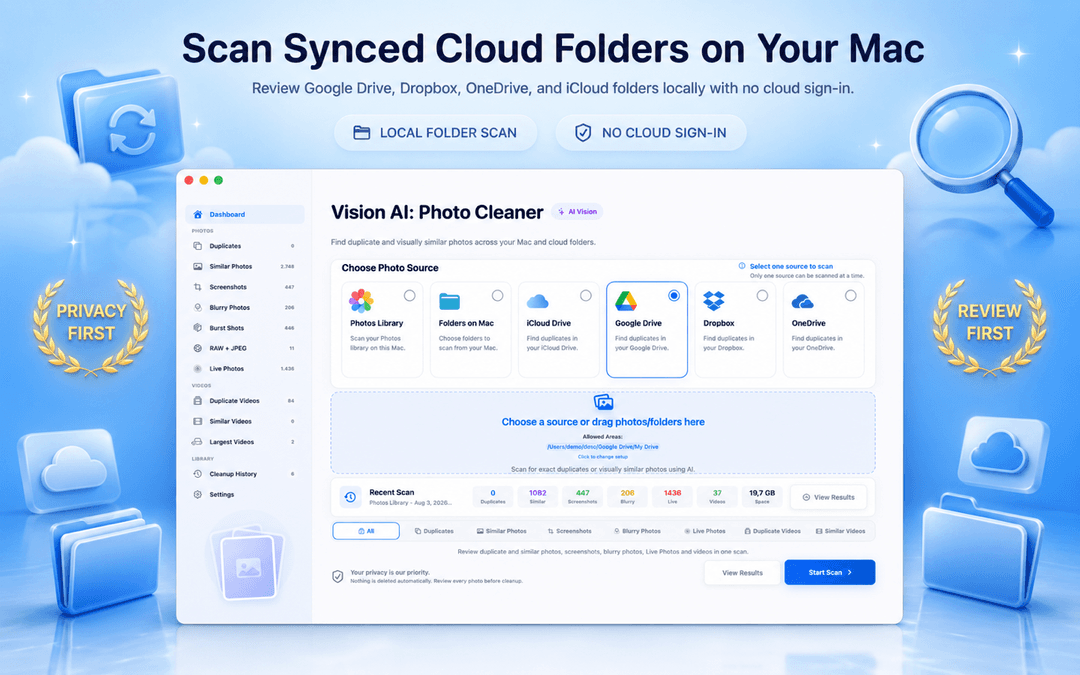
كيفية العثور على الصور المكررة على Mac وحذفها مجانًا في 3 خطوات
تنزيل تطبيق Mac المجاني
حمّل Vision AI - Photo Cleaner من Mac App Store دون الحاجة إلى إنشاء حساب أو تسجيل.
تحديد مكتبة الصور أو المجلدات
افحص مكتبة صور Apple أو محرك أقراص MacBook أو المجلدات السحابية عبر الذكاء الاصطناعي على الجهاز.
المعاينة جنبًا إلى جنب والحذف مجانًا
قارن اللقطات المتشابهة، واحتفظ بالصورة الأكثر وضوحًا، واحذف المكررات مباشرة إلى سلة المهملات.
الأسئلة الشائعة
هل تطبيق Vision AI مجاني بالفعل للبحث عن الصور المكررة على Mac؟عرض الإجابة
نعم. الفحص، والتجميع الذكي بناءً على التشابه البصري، والمقارنة جنبًا إلى جنب، وحذف الصور المكررة على Mac متاحة مجانًا على Mac App Store.
هل يمكنني إزالة الصور المكررة من مكتبة الصور مجانًا؟عرض الإجابة
نعم. يصل Vision AI مباشرة إلى مكتبة صور Apple ويجمع المكررات المتطابقة والصور المتتالية المتشابهة بأمان تام.
هل أحتاج إلى إنشاء حساب أو تسجيل الدخول؟عرض الإجابة
لا. لا يتطلب التطبيق أي بريد إلكتروني أو إنشاء حساب. يمكنك فتحه والبدء في الفحص فورًا.
هل يتم رفع صوري إلى أي خوادم خارجية؟عرض الإجابة
لا. يتم إجراء جميع المقارنات بدقة على جهاز Mac الخاص بك باستخدام المحرك العصبي من Apple.
نظّف صورك بكل سهولة وبدون أي تنازلات
يجب أن يجمع برنامج تنظيف الصور المكررة الممتاز على Mac بين الفحص الذكي على الجهاز وعناصر التحكم الآمنة وغير المقيدة في الحذف.
تنزيل Vision AI - Photo Cleaner من Mac App Store أو زيارة صفحة المنتج.
هل لديك أسئلة؟ مركز الدعم
أدلة ذات صلة

· قراءة 9 دقائق
هل تطبيقات تنظيف الصور على Mac آمنة؟ قائمة تحقق للخصوصية
قبل أن يفحص تطبيق العثور على الصور المكررة جهاز Mac، تحقق من هذه النقاط الثماني: ملصقات الخصوصية، والوصول إلى الصور والمجلدات، ومحركات الأقراص السحابية، ونشاط الشبكة، والحذف الآمن.
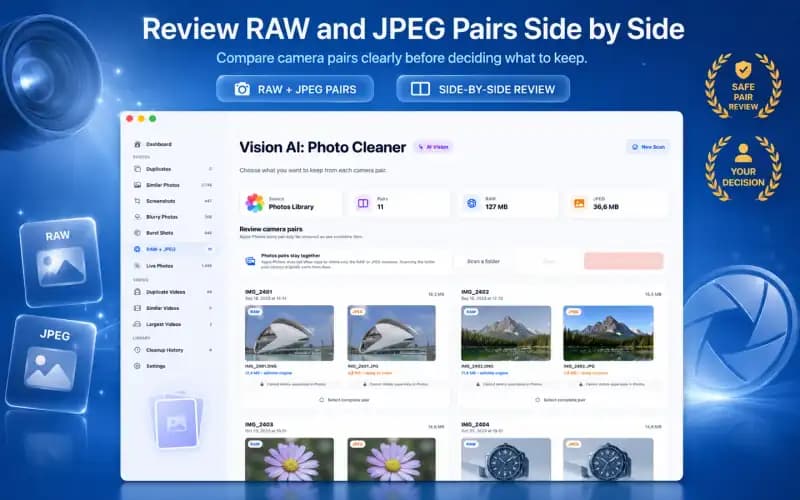
· قراءة 9 دقائق
صور RAW وJPEG على Mac: أي النسختين تحتفظ بها؟ (دليل 2026)
إدارة زوج RAW + JPEG الرئيسي على Mac. تعرّف على كيفية تعامل Apple Photos مع ملفات الكاميرا الأولية، وكيفية تجنب تضخم التخزين المزدوج، ومتى تحتفظ بملفات RAW الرئيسية.

· قراءة 9 دقائق
كيفية إزالة الصور المكررة من iCloud بأمان (2026)
تعرف على كيفية إزالة الصور المكررة من iCloud وMac وiPhone. قم بتنظيف المكتبات المكررة المتزامنة بأمان دون فقدان النسخ الأصلية عالية الدقة.
جاهز في أي وقت
نزّل Vision AI - Photo Cleaner لنظام Mac
اعثر على الصور المكررة والمتشابهة، وراجع الفيديوهات الكبيرة واضغطها محليًا على Mac. اختر ما تريد الاحتفاظ به وأكّد كل عملية تنظيف.
باستخدام Vision AI - Photo Cleaner فإنك توافق على شروط الاستخدام و سياسة الخصوصية.