Address Book Cleaner: Tidy Up Your Contacts Effortlessly
Do you find yourself scrolling through a chaotic list of 'John Smiths' and duplicate phone numbers? Learn how to tidy up your contacts effortlessly.


Do you find yourself scrolling through a chaotic list of "John Smiths," duplicate phone numbers, and outdated email addresses? A messy address book is a common digital headache, causing frustration and wasted time. But fear not, a modern solution exists to bring order to your contacts: the Address Book Cleaner.
Declutter and Organize Your Digital Life
An address book cleaner is a specialized tool designed to scan, analyze, and optimize your contact lists on Apple devices and iCloud. It identifies duplicates, merges incomplete information, and helps you keep a lean, updated directory. Our Address Book Cleaner provides a powerful yet simple interface to manage this process. Let’s look at how it streamlines this essential task.
The Problem vs. The Solution
The utility of the tool is immediate. It visualizes the shift from a fragmented, error-prone 'BEFORE' state (with duplicate alerts and incomplete profiles) to a synchronized, optimized 'AFTER' state, where all records are deduplicated and up-to-date.
Step 1: Securely Connect Your Accounts
First, you will connect the address books you want to clean (e.g., sync local iPhone contacts and iCloud). The tool uses secure authentication methods to access your data without storing your credentials.

Step 2: Intelligent Duplicate Scanning
The cleaner scans all connected accounts. It doesn't just look for exact name matches; it uses smart algorithms to identify potential matches based on variations in names, email addresses, and phone numbers.
Step 3: Review and Merge Duplicates (The Human Touch)
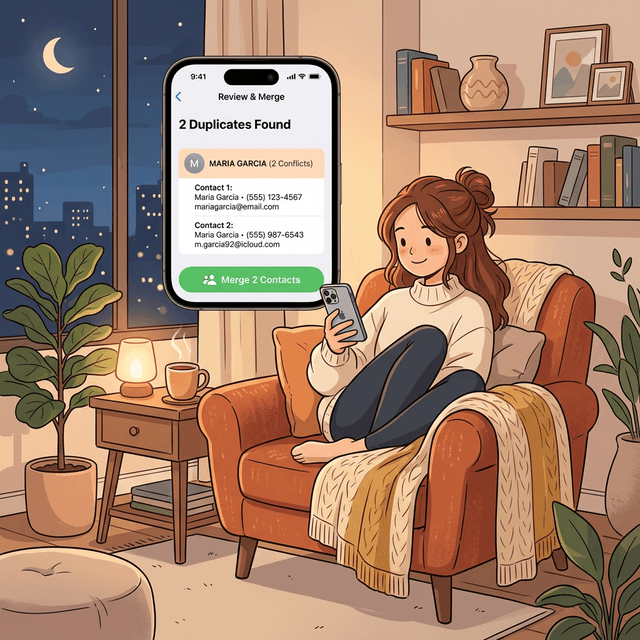
This is where you maintain control. The cleaner presents the found duplicates for your review. The interface groups potential matches and highlights conflicts, such as different phone numbers, before you merge.
Step 4: Keep Details Updated
Beyond duplicates, the cleaner can find and fix formatting issues, add missing country codes to phone numbers, and help you remove contacts with no valid contact information.
Frequently Asked Questions (FAQ)
1. Is it safe to use? How is my data protected?
Safety and privacy are our top priorities. The Address Book Cleaner uses secure, authorized connections (like OAuth) to interact with your contact providers. We use robust encryption to protect data in transit. We do not sell or indefinitely store your personal contact information; it only processes the data required to perform the cleaning actions you authorize.

2. Does it delete contacts automatically?
No. The tool identifies duplicates and potential cleaning actions, but it does not delete or merge anything without your explicit permission. You must review the suggestions and confirm which actions to take. We always recommend creating a backup of your address book before running any automated cleaning tool, just in case.
3. Which address books can it clean?
Our tool is exclusively designed for the Apple ecosystem, supporting the local address book on your iPhone and your iCloud accounts. You can connect and clean multiple iCloud sources simultaneously.
4. Is there a cost to use it?
Our tool is completely free for tasks like scanning, merging, and deleting duplicate contacts. There is no subscription required for these essential features.
5. Will it keep notes, company names, and multiple phone numbers?
Yes. During the review step, the cleaner shows overlapping and unique fields so you can merge entries without losing useful details like notes, labels, company names, or alternate numbers.
Have questions? Support Center
Ready when you are
Download iCleaner Panda for iPhone
Remove duplicate photos, compress videos, and organize contacts with a privacy-first cleanup flow.
By using iCleaner Panda, you agree to our Terms of Use and Privacy Policy.